Chigee mirroring the MyRoute Navigation app - Some questions

grantmac

Commuting between NL & UK
UKGSer Subscriber
Joined
Feb 7, 2017
Messages
4,063
Reaction score
5,295
Location
The Hague, Holland
Question. I am using my Chigee with the MRA app and it works fine. A few issues I have noticed which maybe someone can help with

1. I don’t see a scale in the screen to see how far I have zoomed in or out. Basecamp had this

2. How do I get a compass showing where north is relation to direction of travel

3. Auto zoom doesn’t seem to work for me

4. How do I auto skip missed waypoints. Doesn’t seem to work for me

Thanks for any advice for the uneducated user😁😁😁

=====

I have started this off as a fresh topic (and edited the title slightly) as the answers - which may well help others, too - might otherwise get lost.

It was a toss-up whether to put it in the MyRoute Navigation app section or the Chigee section. Chigee won, best of three.

Richard
 
Last edited by a moderator:
1. I don’t see a scale in the screen to see how far I have zoomed in or out. Basecamp had this

There isn't a scale as such just zoom out or in to see what your looking for.

2. How do I get a compass showing where north is relation to direction of travel

1759167598542.jpg

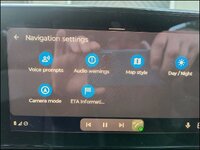
Hit the gear icon on the navigation screen and this screen comes up. There are three camera modes direction of travel (shown here I use it. Direction of travel 2D and North up 2D. As far as I'm aware autozoom and 3d only work in direction of travel camera mode. But I could be wrong.


3. Auto zoom doesn’t seem to work for me. If you use North up it won't as far as I know.

4. How do I auto skip missed waypoints. Doesn’t seem to work for me

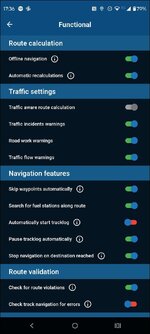
Upturned teardrop (shaping points) are automatically skippable if the option is set in "navigation setting" in the app See Below. The app usually tries to take you back until you go through the next shaping point or if the next one is closer than the last (depending on direction and spacing) Via points "hand Icon" have to be manually skipped. by prodding the skip button on the (android auto or apple carplay) screen.

1759168007608.jpg

 
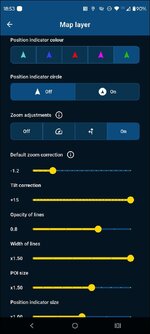
You can also universally change the default zoom correction on the app. I keep it zoomed out further than standard. And for Android auto I use a lot of tilt as this is not reflected as effectively on an android auto device as it is on a phone.

1759168550271.jpg
 
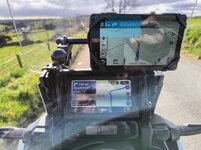
Sorry about the crap picture but this is the only one I could find with the screen navigation buttons active.
To the left of the exit button is the find which brings you to your routes and favourites,
The cog brings up the nav settings shown above.
The little square below exit brings up the map/route overview.
The next Icon is the waypoint skip icon
Below that is the zoom icon which when selected brings up plus and minus icons.

This was taken last march and for the last 7,000 miles since I've only used MRA and occasionally OSMand+ for navigation. The advantage for me is i can use the Honda left hand switchgear to navigate the screen.

1759169358906.jpeg


Back
Top Bottom