Displaying tracks - Or not

RichardD

Active member
UKGSer Subscriber
Joined
Dec 1, 2018
Messages
332
Reaction score
140
Location
Cheshire
As I'm asking daft questions - here's another one:

When I import routes, I generally import the route and the track. By default, the track is visible on the XT map, even if the route/track is not active. In order to turn off the track display, the only way I can see to do that, is to delete the track. Am I missing something?

=====

I have started you a fresh thread.

Richard
 
Last edited by a moderator:
Maybe
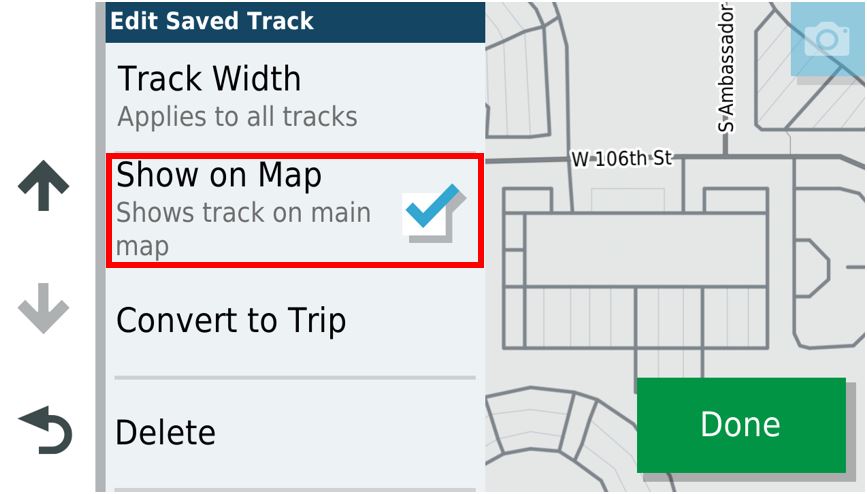
You can chose the colour of each track and whether to show on map or not by a simple tick in the box

You may want to uses numerical prefix or suffixes on your routes and they will be listed in ascending order.
Then archive them. Activate when needed.

Many other options - best method would be how YOU would organize & name them.
 
Is there not an option in Settings (or somewhere) where you have the choice as to whether to displays tracks or not?

I agree, having lots of tracks displayed at once, does lead to possible (likely) confusion as to which track to follow.
 
Maybe
You can chose the colour of each track and whether to show on map or not by a simple tick in the box

You may want to uses numerical prefix or suffixes on your routes and they will be listed in ascending order.
Then archive them. Activate when needed.

Many other options - best method would be how YOU would organize & name them.
I can see how to change the colour of each track, and how to (globally) change the width of track display, but I cannot see any option "to show on a map or not" - either at individual track level, or globally...
 
To add to the above, I resorted to RTFM and sure enough, it shows an option to "show on map" at individual track level.

%2Fasset%2Fimages%2FCapture_Time1714513478517.JPG


It's a pity that option is not actually on my device...
 
Reading this thread - Hide track from map - Zumo user forums, the missing option is something to do with "Explore" and all that malarky. I'll need to continue researching. If I ever find a satisfactory solution, I'll post it here - for completeness.
 
If you pair your XT with Explore, it changes behaviour.

All tracks are shown on the map if you are within some distance (I think 200km) from them.

If you have a lot of tracks (say, you greenlane, etc) it’s a fucking mess.

You can remove the Zumo/Explore association from the debug menu.
I strongly advise doing so.

Follow here: https://www.zumouserforums.co.uk/viewtopic.php?t=1779
 
If you pair your XT with Explore, it changes behaviour.

All tracks are shown on the map if you are within some distance (I think 200km) from them.

If you have a lot of tracks (say, you greenlane, etc) it’s a fucking mess.

You can remove the Zumo/Explore association from the debug menu.
I strongly advise doing so.

Follow here: https://www.zumouserforums.co.uk/viewtopic.php?t=1779

Yes, it seems my Zumo is connected to Explore, although I don't remember doing it...

Anyway, I tried disconnecting - as described in that thread, but as soon as I reenabled Bluetooth and reconnected my phone, all the explore stuff came back. I'm sure I'll get there.
 
It's been about a year since I last connected to explore to test a few things on my XT (then i disconnected explore again its still crap.) I think after I disconnected the explore database using the zumouserforums method I uninstalled then reinstalled the Drive app and when It asked to connect to Explore I cancelled that. I think it was Berin who sussed this out?? If you are using Drive (which is pretty good BTW) I'd also turn off traffic announcements as they tend to be inaccurate and out of date. I use a custom theme for my Tracks so that I can see the track under the route and only turn on the one associated with the current route.
76402.jpg It lets you see route deviations fairly easily.

I also tend only to keep routes and track on the device that I'm going to use soon to keep it tidy and keep my route/track repository on MRA. I make sure that these routes are "Saved Routes" on the device using a method described by John Armstrong (saving the active route) after importing them "imported routes". Using imported routes directly can sometimes cause issues with repeated U-turn requests if you go off route for some reason and have automatic recalculation turned on. The XT is a good unit once used to its foibles.
 
It's a pity that option is not actually on my device...
@RichardD

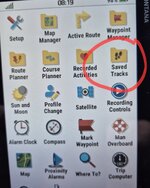
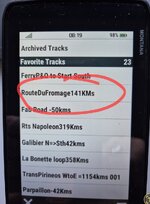
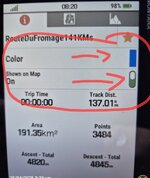
Maybe this helps. Devices have different settings but this is how I get to mine in 3 steps, left to right
Screenshot_20250425_081931_Gallery.jpg Screenshot_20250425_082007_Gallery.jpg Screenshot_20250425_082119_Gallery.jpg
By toggling the slider on or off it displays or not on the map- You can also change its colour and the star is if you list it as a favourite.
Does this help you bit?
 
@RichardD

Maybe this helps. Devices have different settings but this is how I get to mine in 3 steps, left to right

By toggling the slider on or off it displays or not on the map- You can also change its colour and the star is if you list it as a favourite.
Does this help you bit?

Thanks for taking the time to do that.
Can I ask where those screen shots are from (ie, which device or app)?
 
but as soon as I reenabled Bluetooth and reconnected my phone, all the explore stuff came back.

Yes, I had this issue too.
There is something you have to do quickly after the first restart, otherwise the XT reconnects to Explore. I don't remember exactly what it was.
Not sure if I completely deleted my Explore account.

Disable Wifi and Bluetooth on the XT before doing the database reset.


Second page:

This restores your use of Waypoints, tracks and routes back to how it was when you first got your Zumo. It is relatively easy to reinstate, as described in the previous paragraph, and nothing else is broken by performing this simple operation.


It is now necessary to completely un-install the Garmin Drive App from your phone. I don't mean just disable it. Get rid of it completely.

With that out of the way, you can reset the Explore database on your XT. This option is in the system’s Diagnostic Page -> Developer Tests and Tools. which you can access as described below.


Select: Home Screen -> View Map -> Click Speed Button -> Hold Speedo for 10 secs.
This opens up the system Diagnostic Page. Be careful what you do in here!
Scroll down for Developer Tests and Tools -> Click
Scroll down to near the bottom Reset Explore Database -> Click.
Nothing seems to happen. Back out using the return button until you get to the Home page.
Immediately turn the XT completely off - hold the power button in until the screen asks if you want to switch it off. Yes you do. Then restart. If you do not do this immediately, the XT will have chance to start talking to your phone and it will reactivate some of Explore's features.

Select Where To -> Explore and check that you get the screen indicating you are not connected to your Explore account.

You can now reinstall Garmin Drive and set the various options and notifications. Any suggestion that you must install Explore - ignore it. On the Android phone, there is a 3 screen animation which obscures the Skip button. If you can get a pointy finger on it, then press Skip. If not, just wait a few seconds for the animation to complete. I think it then suggests that you want to set up Explore. No you don't - but that option isn't available. 'Maybe Later' will have to do.

The first video in the link above on how to set up Explore deals with seeting up Garmin Drive to talk with your XT. Ignore the other 3 videos - they are to do with setting up Explore !

 
Last edited:
Thanks for taking the time to do that.
You're most welcome Richard
Can I ask where those screen shots are from (ie, which device or app)?
Yes a Montana 710

and IMHO you can save a huge amount of pain by not using any of the Garmin apps- The Garmin units as stand alone ones are good.
The more the level of complexity one introduces to make this thing fit that thing and that software to fiddle with that one and that wire here to bypass this one etc the more you are introducing potential failure and the need for head banging.
 
Yes, I had this issue too.
There is something you have to do quickly after the first restart, otherwise the XT reconnects to Explore. I don't remember exactly what it was.
Not sure if I completely deleted my Explore account.

Disable Wifi and Bluetooth on the XT before doing the database reset.


Second page:

^^^ Thank you!
I have successfully decoupled!

Of course, when I reset the Explore database on the XT, all tracks disappeared. However, when I import a new route, I get a new track, so it's all good.
 
Good news!
Yes I had the same issue of the XT reconnecting. Had to do the procedure a couple of times.

I found Explore to be a pain mostly. Errors in re-downloading the same stuff, sorting tracks and routes was a nightmare.
I'm happier doing manually and activating the tracks manually. I do the same as Mzokk, keeping tracks (manually) visible under routes.
 
And the little tick box for displaying a track will appear so that you can turn them off and on.
 
I make sure that these routes are "Saved Routes" on the device using a method described by John Armstrong (saving the active route) after importing them "imported routes". Using imported routes directly can sometimes cause issues with repeated U-turn requests if you go off route for some reason and have automatic recalculation turned on.

Can you point me in the direction of the "John Armstrong method"?

I have definitely experienced the repeated U-turn request thing, and I'd like to know how to prevent it.

Edit. Found it.

 
Last edited:
@RichardD

Maybe this helps. Devices have different settings but this is how I get to mine in 3 steps, left to right

By toggling the slider on or off it displays or not on the map- You can also change its colour and the star is if you list it as a favourite.
Does this help you bit?
Sorry typo- The star is to choose if you want to put the tracks into the Archive folder (asleep so to speak) or keep it active
Not had my am coffee yet!
 
Last edited:
You have to manually edit the Zumo settings with a text editor to obtain the wider track.

I find that with tracks to the widest (factory standard) settings, you still have the track about 1 pixel wider than the route on each side and, if using contrasting colours, it's easy to spot.
It's like this:


track-route.gif
 
Can you point me in the direction of the "John Armstrong method"?

I have definitely experienced the repeated U-turn request thing, and I'd like to know how to prevent it.
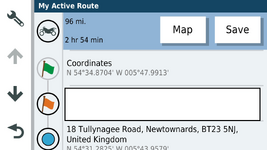
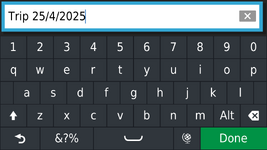
Basically for the route you are going to use start it from imported routes. So its Apps>trip planner>start a route hit go. Then go back to trip planner (without stopping the route) save Active route. It will give you Trip and today's date as a name and the keyboard will pop up so that you can change it.

2874028.png

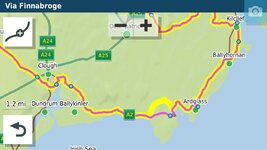
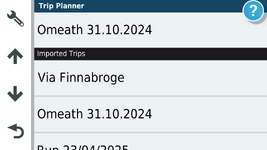
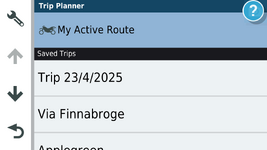
So if we pick Via Finnabroge (which is imported) and start it so that its running

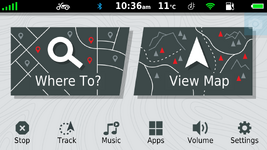
Go back to the home screen.

1745574469773.png

you can see its running because the STOP button is active.

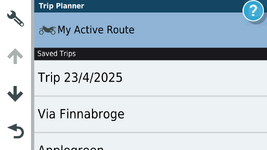
Go back into trip planner.

1745574536435.png
It appears as My Active route.

1745574797756.png

It will bring up this dialog and you can change the name back it you want.

1745574831162.png

1745574940677.png
And it will appear in Saved trips then just run it (along with your track for peace of mind!


Back
Top Bottom