Favourites/Waypoints

Berin

Well-known member
UKGSer Subscriber
Joined
May 29, 2006
Messages
7,679
Reaction score
3,470
Location
South Oxfordshire
I know this has been discussed before, but I haven’t found an answer (at least not one I like).

I’d like to import a number of waypoints (locations of Templar sites in Spain) and then use these to create a series of routes.

I can’t find a way to do this - can anyone help out or is it back to Basecamp?
 
Where/how are the waypoints currently saved?
 
From your favourites list in MRA you can add them as waypoints, and create a route between them (automatically)

First way point added;


Creation of route using only favourites added as waypoints
 
@Berin
Not only have I created those waypoints and their icon for you, but I've already replied extensively.
This begs the rhetorical question...Why did I bother?
 
@Berin
Not only have I created those waypoints and their icon for you, but I've already replied extensively.
This begs the rhetorical question...Why did I bother?

As I understand it, you use BaseCamp.

The OP is now trying to get all the waypoints / points of interest into MyRoute. Do you know how he can do it? I assume there is a Points of Interest ‘loader’ for My`Route available, but it’s not something that interests me, so I don’t know.
 
Last edited:
As I understand it, you use BaseCamp.

The OP is now trying to get all the waypoints / points of interest into MyRoute. Do you know how he can do it? I assume there is a Points of Interest ‘loader’ for My`Route available, but it’s not something that interests me, so I don’t know.

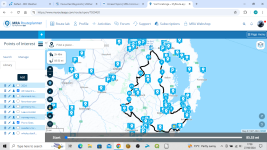
In the web planner open any route. Click on “points of interest”, then “library”, then “add”. You can import a CSV or GPX file with POIs in it.

They will be available in all routes, not just the one you opened to do the import.

2f27fab289d809784eeb346866dae7bf.jpg
 
Last edited by a moderator:
I should point out that MRA management of imported POIs is rubbish. Basically there isn’t any.

If you need to amend the POIs in the file you have imported you’ll need to do it in the original source, delete the imported POI file and reimport the amended one.

I don’t use MRA POIs. I just use the favourites feature and have a few saved that I use all the time, such as home, ferry ports and frequently used hotels and fuel stops or cafes.
 
As I understand it, you use BaseCamp.

The OP is now trying to get all the waypoints / points of interest into MyRoute. Do you know how he can do it? I assume there is a Points of Interest ‘loader’ for My`Route available, but it’s not something that interests me, so I don’t know.
Yes, it’s this. I know perfectly well how to do it in Basecamp, but I’m not taking any devices capable of running basecamp on the trip.
This question relates to MRA.
 
In the web planner open any route. Click on “points of interest”, then “library”, then “add”. You can import a CSV or GPX file with POIs in it.

They will be available in all routes, not just the one you opened to do the import.

2f27fab289d809784eeb346866dae7bf.jpg
I’ll try this, thanks. They are just waypoints, so saving them as favourites is fine. I’ll create a dummy route to import them into and try it.
 
I pretty much do this with all my trips.

I first search for and add all the POI I want to visit, then create a route between them.
I do the whole thing in MRA, I don't feel the need to use anything else.
 
This is my bespoke list of POI's. They will appear with your route If you have ticked the relevant POI's for the route you have planned. They will not appear on other routes unless you tick the POI list on that route. This is Public loos in Ireland (Way point symbol with underscore) and picnic sites are indicated by a P. There are no customisable icons for either of these things. Garmin handles this much better as you can load a custom .gpi file onto your garmin unit. My custom POI file for Public loos in Ireland makes a farty noise when I'm within 1/2 miles of a loo........because I have the brain of a 9 year old :D


1724774453193.png
 
This worked, thanks. I imported my waypoints/POI's, but unlike basecamp which deconstructs the gps file to show the individual poi's this just shows the name of the gpx file, and you have to zoom in quite a way to see them.
But they are available for all routes.

Apparently a Waypoint/poi function is being worked on.


Back
Top Bottom