GPS road details missing

Lord Snooty

Well-known member
UKGSer Subscriber
Joined
Jan 6, 2002
Messages
11,402
Reaction score
2,783
Location
Redditch, Worcs
Looking for some advice here.

I have the Garmin III+ but the level of detail seems to stop at B roads, e.g unclassified roads never seem to show no matter how close I zoom in. Any ideas on how I get this level of detail showing...is there a setting in the GPS or on the Mapsource application that I've missed? I will need this sorted for my tour of Scotland as I intend to do a lot of riding on unclassified roads.

Thanks
 
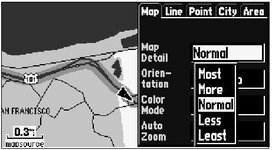
All roads should be showing. In the Ardennes yesterday, I even got the unpaved forest roads on my display...

Could it be you have wrong setting here?
 

Attachments

  • spdetail.jpg
    spdetail.jpg
    26 KB · Views: 144
Not sure if this applies to the III+, but it certainly applies to my aviation GPSMAP 295. Go into setup from the map page on the GPS unit. You may have settings for how certain roads are displayed with the zoom level set to auto. On my 295 really small roads don't show up when the setting is auto until I zoom into 0.8 miles or less on the display. Mess about with this setting if you have it and see if the unclassified roads show up at the zoom level you choose.

Mike
 
Blind leading the blind?

Mike, are you loading the GPS from your computer with Mapsource UK Roads and Recreation for the relevent areas?

If you don't have the discs I'll make copies for you.
I have, World map, Uk roads and recreation,
Europe roads and recreation,
Metro guides for UK, France and Italy.
Tim
 
Assuming that the Mapsource works the same for different units, and mine is an SP3 at v3.13 try:

Edit > Preferences > Display and then on mine you can increase / decrease the map detail which includes the roads dispalyed:) :) :) The only problem is that on "high" it shows everything and my 2 1/2 year old machine goes to sleep when it's updating the maps.
 
John Armstrong said:
Assuming that the Mapsource works the same for different units, and mine is an SP3 at v3.13 try:

Edit > Preferences > Display and then on mine you can increase / decrease the map detail which includes the roads dispalyed:) :) :) The only problem is that on "high" it shows everything and my 2 1/2 year old machine goes to sleep when it's updating the maps.

John, I have this setting on High in Mapsource which does show the detail that I want but I can't seem to replicate this on the Garmin for some reason.

Thanks for your help.


Back
Top Bottom