How to install Garmin maps onto a home computer

Mzokk

Well-known member
UKGSer Subscriber
Joined
Jun 17, 2004
Messages
5,096
Reaction score
3,235
Location
Belfast NI
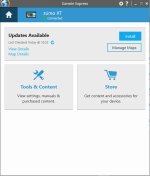
Express1.jpg
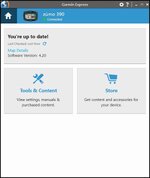
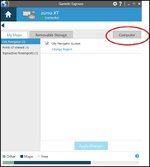
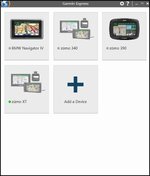
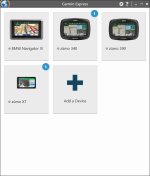
First Screen Garmin Express
See if updates are avaliable for your Device
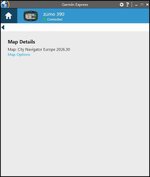
Express 2.jpg
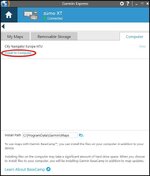
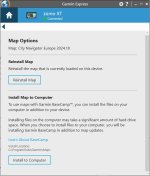
Click on options for the main map

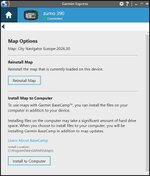
Express 3.jpg

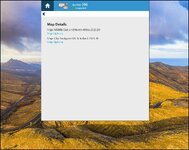
Select the option to load the map onto your computer. The version on your device and the computer will be synced.

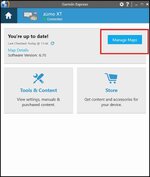
Express 4.jpg
 
I have cut the opening (very helpful) post from a parallel thread and made it a sticky.

See also:


There are also several quite good ‘How to do it’ videos out there.
 
Select the option to load the map onto your computer. The version on your device and the computer will be synced.

View attachment 274210
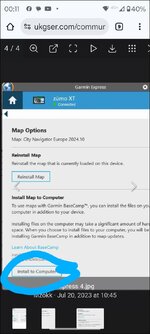
Sorry to be a pain...but why cant I install maps on Basecamp so I dont need to have my Sat Nav plugged in to the computer?

Where it says "Install to Computer" on your post @Mzokk
1000027019.jpg
I haven't got that option on my Garmin Fekkin Twatting Express
I've just got this;

1000027016.jpg

Therefore, I've only got basic mapping of straight lines until I plug in my Garmin.

Also, while I've got your and anyone else's helpful attention, for some unknown, probably fekkwit error, I can only get the Full United Kingdom and Ireland map onto the Garmin even though it says full UK and Europe when on Basecamp with Garmin plugged in. The only other map option I'm given is north fukkin Africa for fekkin fukks sakes.

I'm nearing my therapeutical ambition to take for posterity a video of me destroying, in a petulant frenzy (and whilst screaming obscenities) said Garmin with my 3 lb walling hammer. I need help. Pleeease.
 
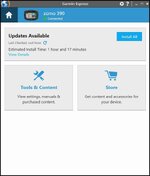
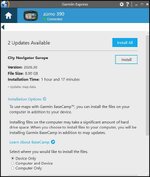
Hi TT. Garmin have changed the way that Express works under the latest version which is 7.27.1.0. I'm loading maps onto an old Garmin Zumo 390 and will post screenshots of the way to do load maps onto the computer when its already loaded on the unit. When you attach the unit it does give the option to load onto the unit itself, both the unit and the computer or just the computer.

1763720351463.jpg

1763720410059.jpg


The 396 should have enough internal memory to to hold the whole of Europe as it has 16GB of internal memory and the map version is 8.90GB so you might have an old map version floating about in the unit that needs to be deleted. The other way to increase memory capacity is to put an SD card in the unit and express will divide the Europe map between the unit and the SD card. If you are using an SD card don't install anything larger than 32GB as this will automatically (in windows at least) be formatted as FAT32 so can be read by Garmin devices. SD cards >32GB get formatted as exFAT in Windows machines and can't be read by Garmin devices.

I'll load up the 390 and see what way it handles loading options for the computer after the maps have been loaded to the unit only.
 
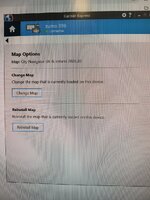
Weird stuff TT. The old Zumo 390 invokes this behaviour in Garmin Express.

1763723527155.jpg

Just like in 2023

1763723596573.jpg

1763723673449.jpg
With the install to computer button

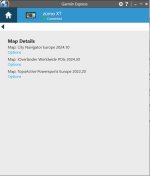
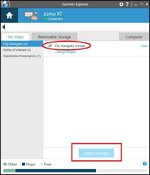
But for my Zumo XT it is different if you go through map details you get to the same screen as you did with the 396 and the install to computer option is gone. This is how you do it on the XT and Maybe on the 396

1763725842777.jpg

1763725896581.jpg

1763725966666.jpg

So the behaviour of Garmin express changes depending on the unit attached. Hopefully the manage maps option with the computer tab will come up with the 396....good old Garmin :D
 
Hi @Mzokk and thanks for your replies. I've not tried with your last post yet as I'm jumping the gun here . Please excuse. My first problem before I go any further is my Maps.

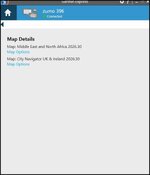
This is what Garmin twatting Express tells me I've got...why the fukk the twats think I want Middle East and North Africa mapping is beyond me.! It also says I've got UK & Ireland maps and that's all. Why can't I get Europe on it which I initially had when I first bought this heap of shite?

Express Map Details.jpg


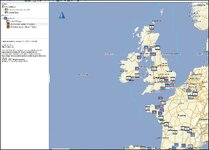
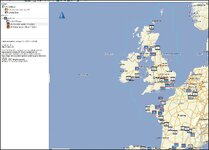
When my unit is plugged into the computer , Basecamp tells me I've got City Navigator Europe, whereas in actual fact Ive only got the UK & Ireland as outlined on the world map in lilac. How can I get all Europe inc UK & Ireland on my Zumo even, never mind my fukkin computer. One step at a time eh.

Wheres Maps.jpg


Apologies to @ Sneldog who has kindly offered to trek over to mine to assist in my future mastery of this devilish , nay fiendish puzzle. I haven't bothered you yet as I seem to remember you are a Mac man and assume that you will work in another language. First and foremost I want some bloody maps. and I also cant get rid of the "Middle East and North Africa" info/option. :blast

Thanks for listening.

( I'm sure it'll be operator error somewhere along the line...it must be. )

I'm now going to watch the Test Highlights on iplayer AGAIN. :smokeboun
 
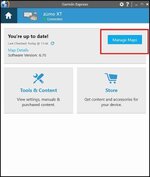
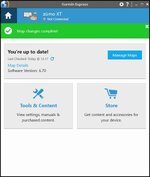
This is for an Zumo XT so hopefully the Zumo 396 may work in the same way. This is on a Windows machine

click on Zumo XT

1763812723483.jpg

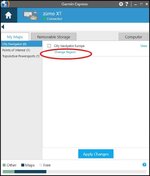
Click on Manage maps

1763812807685.jpg

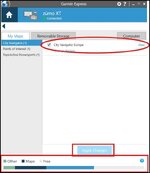
At your own risk!! Untick the UK and Ireland maps you have and the middle east maps and then hit apply changes. This should remove all of the maps from your unit so that you have space to apply European maps. and leave only the base map on the unit. and in the case of my unit POI's and TopoActive Powersports.

1763813402153.jpg

If you hit apply changes the light blue chunk of data disappears off the unit which in my case is the detailed CN Europe maps

1763813700982.jpg
And it frees up a big chunk of space.......but you have no detailed maps only the base map and in my case POI's and the TopoActive powersports.

If you want to risk it confirm the Garmin warnings that you are disappearing your maps.

You will get confirmation that you have gotten rid of your maps :D

1763813991148.jpg

Unplug your unit from the USB port to your computer and plug it in again to make changes. (it has to reboot.) and confirm your maps are unticked and the free space shown above is available.

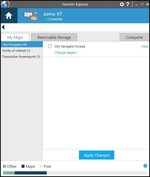
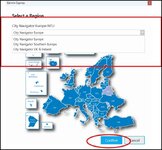
When you plug in your unit again and go to Manage maps under My Maps City Navigator UK and Ireland should still be in the menu but unticked. In this case because I had CN Europe previously installed this is what appears in my menu. Ignore your unclicked Middle East and North Africa Click on Change region under UK and Ireland.

1763815202990.jpg

If you have removed your Middle East and N Africa maps you should have space on your unit to select "City Navigator Europe" as instead of "City navigator UK & Ireland" then hit confirm

1763815474773.jpg

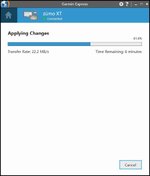
It should start downloading all of Europe.

1763814826828.jpg

When its finished downloading reboot the unit and the maps should be on there. You can check by going to Settings>map and vehicle > scroll down to myMaps and you should have CN Europe NTU 2026.30 ALL North and CN Europe NTU 2026.30 ALL South on the unit and ticked.

Good Luck.
 

Attachments

  • 1763812962798.jpg
    1763812962798.jpg
    38.4 KB · Views: 3
OK TT what happens if you press this button on Garmin express.

1763852211704.jpg
 
OK TT what happens if you press this button on Garmin express.

View attachment 461363


Hiya @Mzokk. Before I answer the above, can I just post in sequence what Im getting when I start up Garmin Express with my Zumo plugged in to the computer. Im not getting half the options youre showing me. Could this Zumo be already "bricked" as you so eloquently say? Could the cable be faulty? Sometimes when i plug the device in, it takes ages to show up, sometimes I get a flag up saying Windows doesnt recognise my piece of shit, and then lo and behold it does.

Anyroad/rode, this is the squence Im getting, along with missing options/tabs.

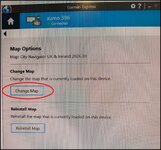
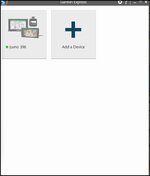
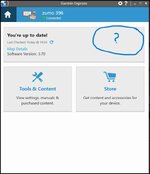
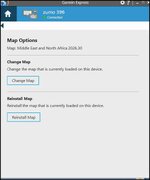
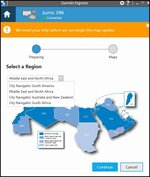
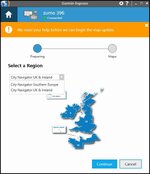
Express Page 1.jpgExpress Page 2.jpgExpress Page 3.jpgMap Options for Middle East and North Africa Page 4.jpgMap Options Change Map Page 5.jpgChange map Page 6.jpg


Then on Basecamp I get this display

Wheres Maps.jpg


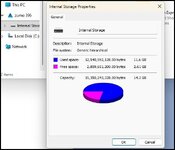
And finally Properties of my Zumo.


Zumo Properties.jpg


Thanks for your patience but I'm just going around in circles here.
 
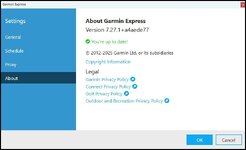
HI TT no its not bricked it all looks OK. But you only have 2.61GB of free space so that's why you can't get all of Europe on your device. The maps for the Middle East and North Africa would have to be removed to free up space to load the Europe maps or if you wanted to retain both you could add a Micro SD card to the device and Garmin express should be able to detect it and divide the European maps between the Unit and the MicroSD card. You have a nice unit that appears to have a license for the mapping for much of the world and you can choose to have what's appropriate. What version of Garmin Express are you using the current version is this one.

1763987180569.jpg

If you are not on this version try updating it to see if you get options to check and uncheck maps. If you are hopefully there is an option somewhere to remove the mapping from the device under "Change Map" to remove MENA maps and install Europe. Lets know how you get on.
 
To add to @Mzokk comments above.
There is a definite bug in Garmin express that stops updating.
You are better off deleting the current version, and downloading the latest version to do a fresh install.
I think it's to do with Window updates corrupting things
 
To add to @Mzokk comments above.
There is a definite bug in Garmin express that stops updating.
You are better off deleting the current version, and downloading the latest version to do a fresh install.
I think it's to do with Window updates corrupting things
Good advice. (y) While we are on the subject of odd Garmin Behaviour don't have Basecamp open when working with Garmin express.......they don't like each other :D
 
It tells me it's Up to
HI TT no its not bricked it all looks OK. But you only have 2.61GB of free space so that's why you can't get all of Europe on your device. The maps for the Middle East and North Africa would have to be removed to free up space to load the Europe maps or if you wanted to retain both you could add a Micro SD card to the device and Garmin express should be able to detect it and divide the European maps between the Unit and the MicroSD card. You have a nice unit that appears to have a license for the mapping for much of the world and you can choose to have what's appropriate. What version of Garmin Express are you using the current version is this one.

View attachment 461696

If you are not on this version try updating it to see if you get options to check and uncheck maps. If you are hopefully there is an option somewhere to remove the mapping from the device under "Change Map" to remove MENA maps and install Europe. Lets know how you get on.

It tells me it's up to date with
software version 3.70. updated yesterday and day before etc. what's the orange warning banner that says ""we need your help before we can update your maps"?
Will look later as I'm out working thanks.


Back
Top Bottom