
The Orange banner just wants you to select an option before it starts. 





I suspect there might be a hammer involvedHas the device / PC / owner gone out of the window yet?


No it hasn't. I have to pace myself. I have also other things to deal with in life and have already spent a number of hours going around in circles for nothing. It's Tuesday evening and I've just deleted Basecamp and Express off my device and computer before having a great big plate of fekkin chips.Has the device / PC / owner gone out of the window yet?
 , I'm going to download Garmin Express and Basecamp. I will then step back from the computer a retire to bed with a book and a snifter. Tomorrow hopefully, I shall be able to update you all on further successful progress.
Haha @Mzokk. Sunday night ( I think it was Sunday, it's all a blur) almost became precariously close to Hammer time, it really did. However your reply inferring my device was fine, brought me back from the brink just in time.I suspect there might be a hammer involved

Never. These things are tricky at times and my "Help" might not be useful as it could be, as I'm guessing on the basis of other Zumo units not that model in particular. One thing if you could check your Garmin express version rather than the software version of the Zumo. They change the express version regularly......... sometimes for the better and sometimes for the worse. The current version seems to work quite well.No it hasn't. I have to pace myself. I have also other things to deal with in life and have already spent a number of hours going around in circles for nothing. It's Tuesday evening and I've just deleted Basecamp and Express off my device and computer before having a great big plate of fekkin chips.
Once I've posted this "progress report"
Haha @Mzokk. Sunday night ( I think it was Sunday, it's all a blur) almost became precariously close to Hammer time, it really did. However your reply inferring my device was fine, brought me back from the brink just in time.
I will Percy Vere and thanks again for not saying "oh do fekk off you idiot".



 but its not that hard.
My skill level is at an all time lowIf you use Garmin Express and install the maps (CNEU) onto the SD card, they will be deleted from your internal memory. GE will not install the same map on both.
For maps in basecamp, copy the .img files from x:\Map (sd-card) to your PC hard drive
Then:
View .img files in Basecamp.
Depends on your skill level
 !
! I have temporarily given up on it all as am rather nauseous from going around and around in circles, but will hopefully return for more help and torture as long as the lobotomy is a success.
 )
)

Is it right that to be able to "play" with Basecamp and it's "detailed" maps you have to have the Zumo plugged in to the computer
Your G. Express problems stem from lack of space in internal memory.There is no update or progress for me to regale you with at the moment, despite everyone's help.
Tried that a couple of years ago. Can't remember how it planned out. I'll give it another go thanks if all else fails.Mapsource is still available ... The other option is to use Open Street Maps. Have a look here https://www.ukgser.com/community/th...et-maps-on-old-and-new-garmin-devices.439311/
After you've had a lie down!
Thanks.Yes.
Thanks @Redboots , I'll go over it again sometime when I've e calmed down.Your G. Express problems stem from lack of space in internal memory.
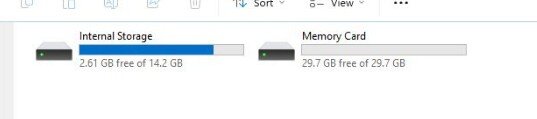
I will not allow you to update the maps because you only have a couple of GB free and the maps can be 4 GB plus..
View attachment 463374
Its a stupid idea on Garmins part as you would expect it to overwrite the old maps, but no.
Reformat the SD card to FAT32 - as long as there is nowt you want on it.
Re-insert and restart Express. Its not very intuitive, but there is the ability to select the DS Card for new/updated maps.
After it installs the map to the SD, the space will be freed on internal memory.
Also, when the maps are installed on the SD Card, they become visible in the Map directory. Its then easy to copy the .img files to the PC.
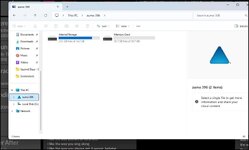
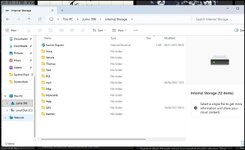
Once the unit is connected to PC/Express, Tools & Content, the Utilities. Scroll to the bottom and you should see the Internal and SD card memory.


They were my first thoughts but I thought I’d keep schtum as TT’s thread seems to be all about the Z396Your G. Express problems stem from lack of space in internal memory.
I will not allow you to update the maps because you only have a couple of GB free and the maps can be 4 GB plus..
 and half of Asia
  , I’d say it would be substantially more even though most of it is desert.
Not necessary if you've downloaded the maps to the computer. You can play as much as you like….Is it right that to be able to "play" with Basecamp and it's "detailed" maps you have to have the Zumo plugged in to the computer

Not if you've downloaded the maps to the computer - works for the CN maps, but the newer topo maps or the OS maps on card are available only if you've the device plugged inYes.
Thank you too Joe. BUT....how do I download the maps to my poota and where do I download them from. ( Sorry, I know it's painful, it is for me too.Not necessary if you've downloaded the maps to the computer. You can play as much as you like….
)
Don’t worry about it.I said ‘Yes’ only in as much as the poor fellow seems to be unable to load the maps to his computer and / or to his device. If he can find a way to get the maps onto his computer, without the device being connected, he can then find a way to get them to his device…. Or not.
Having the maps installed on his computer only, won’t be a lot of help if the same maps are not installed on his device, I guess.
Or maybe I have missed a bit in this unfolding tail of woe?
PS If it brings him any joy, my large ‘Motorhome’ Garmin device is refusing to update its maps. Schadenfreude, is much underrated.



