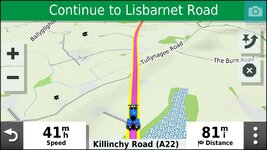
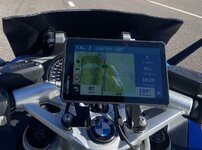
I’ve just bought a Garmin XT

yes just load the route Apps>Trip Planner>(Saved or imported trips)>Map and your route will cover your track. Scroll along the route and you will see the track if it diverges from the route. In the case above it probably won't but if you tried to route via Syrie and Loch Badenloch the result might be different. I lost a bit of CB900F2C fairing up there in 1986.........wonder if it’s still there :D
Thanks, I’ll have a look for fairing when I next go there.
 
Can the XT like the XT2 have a user selected track width? If it does, then setting it wider than the route let's you see both at the same time.

I tend to use black or white track colours so that they show up well on the maps and less likely to get confused with the colours of the roads.
 
Can the XT like the XT2 have a user selected track width? If it does, then setting it wider than the route let's you see both at the same time.

I tend to use black or white track colours so that they show up well on the maps and less likely to get confused with the colours of the roads.
yes. I don't bother, since I know if I can't see the track I'm on course
 
Can the XT like the XT2 have a user selected track width? If it does, then setting it wider than the route let's you see both at the same time.

I tend to use black or white track colours so that they show up well on the maps and less likely to get confused with the colours of the roads.
The XT standard track width is not quite wide enough to be seen beneath the route line. I have a modified theme that makes the track with wider so that it can be seen below the route line.
 
The XT standard track width is not quite wide enough to be seen beneath the route line. I have a modified theme that makes the track with wider so that it can be seen below the route line.
On my XT there is a wider and a widest setting for tracks. I have it set to widest I changed the colour to vivid green too.
 
Garmin uses *.kmtf file's for themes and these can be opened in a text editor. I took the UK theme copied it and altered this line from a value of "1.00" to "2.50" this gives plenty of latitude for the track line to be wider than the route line. I then saved the altered theme back to the unit and use it instead of the UK theme profile.

<STYLE field = "MAP_TRK_CLR" scale = "2.50" >
<COLOR >
<PRIMARY day = "#06EEEE" night = "#06EEEE" />
<SECONDARY day = "#0A92E2" night = "#0A92E2" />
</COLOR>
</STYLE>
 
Garmin uses *.kmtf file's for themes and these can be opened in a text editor. I took the UK theme copied it and altered this line from a value of "1.00" to "2.50" this gives plenty of latitude for the track line to be wider than the route line. I then saved the altered theme back to the unit and use it instead of the UK theme profile.

<STYLE field = "MAP_TRK_CLR" scale = "2.50" >
<COLOR >
<PRIMARY day = "#06EEEE" night = "#06EEEE" />
<SECONDARY day = "#0A92E2" night = "#0A92E2" />
</COLOR>
</STYLE>
Have you used this to get changes for track width etc?

 
Have you used this to get changes for track width etc?

I now have it loaded John but changed the theme file before I knew of its existence. When I loaded it I used it to change the map tilt in basecamp from the default 35 degrees latitude (which probably works fine for the USA) to 52 degrees latitude which works much better for GB & Ireland. (y)
 
I've been loving my XT for a few years. It followed a 660 and 550 before that.

I reckon I've got Basecamp under control too.

I love planning my annual trips plus almost any journey.

A 50 pence mod. to the original mount worked for me. No jog wheel. No music. No phone calls. No verbal directions.

Bracket2.jpg


Back
Top Bottom