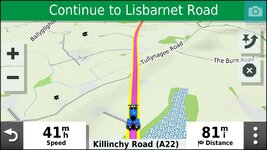
I’ve just bought a Garmin XT

yes just load the route Apps>Trip Planner>(Saved or imported trips)>Map and your route will cover your track. Scroll along the route and you will see the track if it diverges from the route. In the case above it probably won't but if you tried to route via Syrie and Loch Badenloch the result might be different. I lost a bit of CB900F2C fairing up there in 1986.........wonder if it’s still there :D
Thanks, I’ll have a look for fairing when I next go there.
 
Can the XT like the XT2 have a user selected track width? If it does, then setting it wider than the route let's you see both at the same time.

I tend to use black or white track colours so that they show up well on the maps and less likely to get confused with the colours of the roads.
 
Can the XT like the XT2 have a user selected track width? If it does, then setting it wider than the route let's you see both at the same time.

I tend to use black or white track colours so that they show up well on the maps and less likely to get confused with the colours of the roads.
yes. I don't bother, since I know if I can't see the track I'm on course
 
Can the XT like the XT2 have a user selected track width? If it does, then setting it wider than the route let's you see both at the same time.

I tend to use black or white track colours so that they show up well on the maps and less likely to get confused with the colours of the roads.
The XT standard track width is not quite wide enough to be seen beneath the route line. I have a modified theme that makes the track with wider so that it can be seen below the route line.
 
The XT standard track width is not quite wide enough to be seen beneath the route line. I have a modified theme that makes the track with wider so that it can be seen below the route line.
On my XT there is a wider and a widest setting for tracks. I have it set to widest I changed the colour to vivid green too.
 
Garmin uses *.kmtf file's for themes and these can be opened in a text editor. I took the UK theme copied it and altered this line from a value of "1.00" to "2.50" this gives plenty of latitude for the track line to be wider than the route line. I then saved the altered theme back to the unit and use it instead of the UK theme profile.

<STYLE field = "MAP_TRK_CLR" scale = "2.50" >
<COLOR >
<PRIMARY day = "#06EEEE" night = "#06EEEE" />
<SECONDARY day = "#0A92E2" night = "#0A92E2" />
</COLOR>
</STYLE>
 
Garmin uses *.kmtf file's for themes and these can be opened in a text editor. I took the UK theme copied it and altered this line from a value of "1.00" to "2.50" this gives plenty of latitude for the track line to be wider than the route line. I then saved the altered theme back to the unit and use it instead of the UK theme profile.

<STYLE field = "MAP_TRK_CLR" scale = "2.50" >
<COLOR >
<PRIMARY day = "#06EEEE" night = "#06EEEE" />
<SECONDARY day = "#0A92E2" night = "#0A92E2" />
</COLOR>
</STYLE>
Have you used this to get changes for track width etc?

 
Have you used this to get changes for track width etc?

I now have it loaded John but changed the theme file before I knew of its existence. When I loaded it I used it to change the map tilt in basecamp from the default 35 degrees latitude (which probably works fine for the USA) to 52 degrees latitude which works much better for GB & Ireland. (y)
 
I've been loving my XT for a few years. It followed a 660 and 550 before that.

I reckon I've got Basecamp under control too.

I love planning my annual trips plus almost any journey.

A 50 pence mod. to the original mount worked for me. No jog wheel. No music. No phone calls. No verbal directions.

Bracket2.jpg
 
I've attached a pdf from the zumo forums to get you started

I don’t mind the document being posted on this forum - you are a good group of people, but it’s always nice to get a bit of credit for my efforts.

Better still, post a link to the site where is is hosted. I can answer any questions directly then. I don’t often come back to thIS site - not having a GS.


1524 downloads so far. It seems to be popular !

In response to the earlier query @Berin , @squibb34 - the XT2 will fit into the XT1 mount and the XT2 is designed to work with the 5v power that the XT1 mount provides - and it will charge it as well. I have the XT1 mount on my desk powered with a transformer feeding 12v to the XT1 harness, which steps it down to 5v. Both devices fit and charge in the XT1 mount.

The XT2 mount is designed to not allow the XT1 to fit - the XT2 mount has 6 pins - an extra one at the top supplying 12v. It also has ridges to prevent the XT1 from seating properly so that the 12v pin cannot touch the XT1 contacts.
 
I don’t mind the document being posted on this forum - you are a good group of people, but it’s always nice to get a bit of credit for my efforts.

Better still, post a link to the site where is is hosted. I can answer any questions directly then. I don’t often come back to thIS site - not having a GS.
Sorry, didn't mean to upset you, I have indeed read a lot of your contributions on the zumo forum. I had your pdf on my desktop for ref, so attached it - my bad.

Credit wise, your name is on the front of the doc :)

I didn't know you were a member on here as well - PS I don't own a GS either.
 
No problem - as I said, I don't mind that happening on this particular forum - but the name check is always appreciated in the post - it also has the benefit that I am alerted so I can tune in in case anyone needs further explanation. I've been around for about 10 years, but only contribute when I am alerted to a topic that I am following - which hasn't happened for a while.
 
I never did publish the full set of pages as a pdf file that I worked on for the Zumo XT. Things kept changing too quickly.

But it is all there at this link - if you haven’t already come across it.
 
I never did publish the full set of pages as a pdf file that I worked on for the Zumo XT. Things kept changing too quickly.

But it is all there at this link - if you haven’t already come across it.
The work you have done on the XT is brilliant. Just one question, have you changed your view at all on MRA gpx1.1 vs gpx1.2. Read somewhere on the zumo XT forum that gpx 1.2 was being recommended. I'll re-read your review of the two formats, but can you just reiterate why 1.2 isn't the preferred option.
 
Ok, to use the XT that I have acquired means buying a 3DAM adapter. Has anyone on here bought one? If so was it pretty straightforward to fit? Is it secure if it’s the locking one? Does anyone have a recommendation as to the supplier?
Thanks in advance.
 
The work you have done on the XT is brilliant. Just one question, have you changed your view at all on MRA gpx1.1 vs gpx1.2. Read somewhere on the zumo XT forum that gpx 1.2 was being recommended. I'll re-read your review of the two formats, but can you just reiterate why 1.2 isn't the preferred option.
Thank You

Have I changed my view ? Quite possibly. I cannot remember what my view was - I think that I was just stating the facts as I see them.

But my present view is as follows:

From MRA, v 1.1 contains all of the route points - the via points (orange flags on the Zumo map), and the shaping points (the blue discs on the map). It also includes any of MRA's Points of Interest that you may have included in the route. These are correctly defined in the GPX file as Waypoints. (Garmin's definitionon of a Waypoint is basically a saved location - whether it is in a route or not. MRA uses the term 'waypoint' to refer to any point on the route - which for any of the Zumos is completely wrong).
However, v1.1 does not include a plot of the route - ie non of the hundreds of invisible ghost points that force the route to follow exactly the same route that MRA plotted on the map. The Zumo has to calculate the route for itself. IT may or may not follow the roads that you drew on the MRA map.

That means that if the route recalculates, it doesn't know where you intended to travel - it has only the route points (via and shaping) to work with - but it will still visit every route point (via or shaping) in turn.

------

MRA GPX v1.2 DOES contain all of the invisible route points (I call them ghost points - you cannot see them, but they are there). When the Zumo receives the route, it plots it EXACTLY as is was on the MRA screen.
However, it strips out all of the shaping points. If the route recalculates, it has only the Via Points to work with.

-----

There are ways to deal with these situations. For MRA v1.2, you could for example turn off automatic recalculation.

MRA automatically creates a track for the route. A track can be displayed on the screen at the same time as the route. If you make it wider (by editing the KMTF file), then you can see a black (say) peeping out from under the magenta route, and if you deviate from the route then you have a choice - follow the newly calculated route, or follow the original track.

All XTs will display RUT behaviour for imported routes - in certain circumstances. RUT is a term that I came up with for 'being stuck in a RUT' - you deviate from the route, and it seems to want to take you back to the point of deviation. In fact, that is not what it is trying to do. It is a result of what looks to me like lazy programming. You deviate from the route (eg for road closure or traffic jam). The Zumo recalculates, and quite rightly wants you to go back to where you left the route. 'Quite rightly' because initially, that is the best way to continue your journey. So you've reached point A and it want to take you back to where you left the route.

You ignore it. After a short while you reach point B, (say 400m further up the road). What I expect it to do is to rethink this and repeat the calculation from my new position (B) to the next route point. Eventually it should realise that the way that you are heading is the best way to get to the next route point. Certainly, that is what the Zumos do if you have built the route using the on-screen route planner. But for any imported route, it doesn't do that. Instead it calculates a way back to the last point where it asked you to turn back. So it is now taking you from Point B, then to Point A, then to where you left the route.
Continue and it keeps repeating this sequence so by the time you have ignored 10 U-turn requests it is taking you from Point J to I - H - G - F - E - D - C - B - A - original route.

It cannot escape from that sequence - it is stuck in a RUT. (Characterised by repeated U turns - but it does the same thing if U turns are turned off).

What actually happens is that after each ignored U turn request it adds a new section of route back to the last U turn request. This behaviour is particularly interesting if you turn off U turns - the satnav uses side roads, crescents, housing estates, laybys etc to get you to go back without doing U turns. Iteresting (and proof) becasue the new route will include all of these side-road-turn-back-loops !

I have an example where I have continued on my intended route and have reaached a point just one mile away from the genuine original route, and it is still routing me back in a loop 29 miles to reach the same point.

The same fault was carried over to the XT2 - which they 'fixed' recently. The satnav now aims for the closest point of the genuine original route, not the modified one.

This issue happens only with imported routes - ie those from Basecamp, My Route APP, Kurviger etc. Any route that has been imported from a GPX file. It doesn't happen with 'Saved' Routes - ie those that have been created on the Zumo screen itself using the inbuilt route planner / trip planner.

You can import a route from a gpx file, and then resave it. It then becomes a saved route.
On the XT2 there is an option to copy the route. On the XT1 you have to save the active route with a slightly modified name.

I never create a route by using a lot of shaping points as advised by some people. I find that a lot of shaping points confuse the issue - becasue the Zumo will still insist that you visit shaping points if you are not on the original route.

A typical day long route for me will have 5 Via Points. A start and an end and 3 other Via Points which I place on the road that I want to be on after making coffee stops. That way if I have to restart the route when messing with the stanav in the cafe, I have a Via point just ahead that I can select as the next destination.

Shaping points I use to force the route onto particular roads - but typically I'll have between 3 and 6 of these. Carefully placed - ie not at junctions, but say half way along the road I want to be on. Sometimes I will need to put two at 1/3 and 2/3 distance along a road.

Rarely I need more - but say the B7076 which is the old A74 north from Carlisle. A delightful road that keeps you off the M74. But there are many junctions onto the motorway, and it likes to jump on at every opportunity. In cases like this I'll add more shaping points than I would like.

I use shaping points because if you do not visit them but rejoin the magenta route, then the satnav continues ahead. With Via points you must visit them.

MRA 1.2 does not have shaping points. That means if you want to force the route, you have to use Via Points. And you may end up with a lot.
This has a number of issues - Vias must be accurately placed. You have to zoom in on each one to make sure that it is on the road. On the correct carriageway.
Via mark the end of a segment of the route. Some features of the Zumo - eg traffic - do not look further ahead than the next Via point. (I may be wrong about that, but its a theory that I have yet to observe being disproved.
Via points show up in the Trip data on the side of the screen. I like to have that so that my pillion knows how far we are from the end or from the next coffee stop.

My preference if to have the original route with Vias and Shaping points. Something that MRA does not provide, but which Basecamp does provide.
I like MRA because I can access the website if I need to make a new route while on tour. I can get it on my ipad. I bought lifetime gold membership.
I prefer Basecamp because it creates the files in the format I want to use. It still works well with XT2 and XT3. It isn't 100% compatible because it cannot create routes that have different routing preferences for each segment, and it cannot create the different adventure level routing. But I don't use that anyway. I set it to the motorcycle profile and Faster time.

FrankB on Zumo User Forums has developed an excellent tool for transferring GPX files to the Zumos. The XT2 and XT3 in particular tend to modify your route points. They look up the coordinates in a database and move them to a nearby known location -which sometimes changes the position significantly, and always changes the name. It does this on import,

FrankB's program - TripManager - gets round this and a lot of other issues. It processes the gpx file and places the resulting Trip file into the hidden .System folder. The Zumo never gets to see the GPX file. It doesn't need to import it. Turn on the Zumo and it is there. You also get to see a preview of the route on the PC screen and can modify other parameters such as track colour. It also sets every route as 'Saved' so you get routes behaving as I think that they should.

Back to the original question - which do I prefer ?
The real answer is neither. I will use Basecamp, but if I had to use MRA when away I will export as GPX v1.1. The chances are that the later zumos will recalculate the route anyway. I'd rather that it had the shaping points to create something more like the route that I planned. That isn't a preference. It is (for me) the best of a bad situation. V1.2 offers me absolutely nothing.

Incidentally - Basecamp can produce the same thing as MRA GPX v1.2 - you just select the option in Basecamp to strip the shaping points. (GPX v1.2 is a 'standard' which MRA seem to have created).

** Circumstances which cause imported routes to 'misbehave' - are usually the things that cause the entire route to be recalculated. Notably:
i) Using Closest Entry Point
ii) Using the Skip Button.

There may be others. But these two do not cause any issue with Saved Routes.

Much of the debate about routes being recacluated have become meaningless - the XT2 and (I believe the XT3) will recacluate the route at the drop of a hat. With the Tread and Explore Apps, it recalculates it as soon as it re-synchs, often moving shaping points onto any nearby faster road - the very thing that they were placed to avoid.

I do have Tread installed on my XT2 but do not allow it to synch. Similarly for the XT1, I have Explore installed, but it is not allowed to synch. Unforunately, on the XT1 if you do not have Explore installed you cannot use the collections feature which allows you to group together the route, track and stored waypoints into a single 'collection' or named group. You can then turn on the data for just one day.

The XT2 gives you a much better set of tools for managing data in collections on the XT2 screen - and it doesn't require the Tread App to synch with the Explore database. If you want to see the XT2 screens - I've set up a mockup here. Use the link back to the menu to see other XT2 related stuff. There is also a massive section on the Zumo XT1 on the same forum pages.


I guess that to anyone else tuning in to this post one reaction may be - rubbish - He's talking small round things.

I'm not. But if you think that, then please ask the question. I was in a similar position when I progressed from the 550 and 660 to the Zumo 590. It was a whole new world. Everything that I knew to be true for the Zumos no longer applied. I was about to throw it at the wall. No one could help me. Those that tried to help filled in the gaps in their knowledge with rubbish, rather than say that they didn't know. It's normal to become suspicious of info that you get on line. Please ask if you disagree or don't understand.

Please excuse any typos. I have what I refer to as keyboard dyslexia. I know how to spell words correctly. The letters leave my brain in the correct order. The signals reach my fingers in the wrong order. I spot most of them, but there will be some !

 
Thank You

Have I changed my view ? Quite possibly. I cannot remember what my view was - I think that I was just stating the facts as I see them.

But my present view is as follows:

From MRA, v 1.1 contains all of the route points - the via points (orange flags on the Zumo map), and the shaping points (the blue discs on the map). It also includes any of MRA's Points of Interest that you may have included in the route. These are correctly defined in the GPX file as Waypoints. (Garmin's definitionon of a Waypoint is basically a saved location - whether it is in a route or not. MRA uses the term 'waypoint' to refer to any point on the route - which for any of the Zumos is completely wrong).
However, v1.1 does not include a plot of the route - ie non of the hundreds of invisible ghost points that force the route to follow exactly the same route that MRA plotted on the map. The Zumo has to calculate the route for itself. IT may or may not follow the roads that you drew on the MRA map.

That means that if the route recalculates, it doesn't know where you intended to travel - it has only the route points (via and shaping) to work with - but it will still visit every route point (via or shaping) in turn.

------

MRA GPX v1.2 DOES contain all of the invisible route points (I call them ghost points - you cannot see them, but they are there). When the Zumo receives the route, it plots it EXACTLY as is was on the MRA screen.
However, it strips out all of the shaping points. If the route recalculates, it has only the Via Points to work with.

-----

There are ways to deal with these situations. For MRA v1.2, you could for example turn off automatic recalculation.

MRA automatically creates a track for the route. A track can be displayed on the screen at the same time as the route. If you make it wider (by editing the KMTF file), then you can see a black (say) peeping out from under the magenta route, and if you deviate from the route then you have a choice - follow the newly calculated route, or follow the original track.

All XTs will display RUT behaviour for imported routes - in certain circumstances. RUT is a term that I came up with for 'being stuck in a RUT' - you deviate from the route, and it seems to want to take you back to the point of deviation. In fact, that is not what it is trying to do. It is a result of what looks to me like lazy programming. You deviate from the route (eg for road closure or traffic jam). The Zumo recalculates, and quite rightly wants you to go back to where you left the route. 'Quite rightly' because initially, that is the best way to continue your journey. So you've reached point A and it want to take you back to where you left the route.

You ignore it. After a short while you reach point B, (say 400m further up the road). What I expect it to do is to rethink this and repeat the calculation from my new position (B) to the next route point. Eventually it should realise that the way that you are heading is the best way to get to the next route point. Certainly, that is what the Zumos do if you have built the route using the on-screen route planner. But for any imported route, it doesn't do that. Instead it calculates a way back to the last point where it asked you to turn back. So it is now taking you from Point B, then to Point A, then to where you left the route.
Continue and it keeps repeating this sequence so by the time you have ignored 10 U-turn requests it is taking you from Point J to I - H - G - F - E - D - C - B - A - original route.

It cannot escape from that sequence - it is stuck in a RUT. (Characterised by repeated U turns - but it does the same thing if U turns are turned off).

What actually happens is that after each ignored U turn request it adds a new section of route back to the last U turn request. This behaviour is particularly interesting if you turn off U turns - the satnav uses side roads, crescents, housing estates, laybys etc to get you to go back without doing U turns. Iteresting (and proof) becasue the new route will include all of these side-road-turn-back-loops !

I have an example where I have continued on my intended route and have reaached a point just one mile away from the genuine original route, and it is still routing me back in a loop 29 miles to reach the same point.

The same fault was carried over to the XT2 - which they 'fixed' recently. The satnav now aims for the closest point of the genuine original route, not the modified one.

This issue happens only with imported routes - ie those from Basecamp, My Route APP, Kurviger etc. Any route that has been imported from a GPX file. It doesn't happen with 'Saved' Routes - ie those that have been created on the Zumo screen itself using the inbuilt route planner / trip planner.

You can import a route from a gpx file, and then resave it. It then becomes a saved route.
On the XT2 there is an option to copy the route. On the XT1 you have to save the active route with a slightly modified name.

I never create a route by using a lot of shaping points as advised by some people. I find that a lot of shaping points confuse the issue - becasue the Zumo will still insist that you visit shaping points if you are not on the original route.

A typical day long route for me will have 5 Via Points. A start and an end and 3 other Via Points which I place on the road that I want to be on after making coffee stops. That way if I have to restart the route when messing with the stanav in the cafe, I have a Via point just ahead that I can select as the next destination.

Shaping points I use to force the route onto particular roads - but typically I'll have between 3 and 6 of these. Carefully placed - ie not at junctions, but say half way along the road I want to be on. Sometimes I will need to put two at 1/3 and 2/3 distance along a road.

Rarely I need more - but say the B7076 which is the old A74 north from Carlisle. A delightful road that keeps you off the M74. But there are many junctions onto the motorway, and it likes to jump on at every opportunity. In cases like this I'll add more shaping points than I would like.

I use shaping points because if you do not visit them but rejoin the magenta route, then the satnav continues ahead. With Via points you must visit them.

MRA 1.2 does not have shaping points. That means if you want to force the route, you have to use Via Points. And you may end up with a lot.
This has a number of issues - Vias must be accurately placed. You have to zoom in on each one to make sure that it is on the road. On the correct carriageway.
Via mark the end of a segment of the route. Some features of the Zumo - eg traffic - do not look further ahead than the next Via point. (I may be wrong about that, but its a theory that I have yet to observe being disproved.
Via points show up in the Trip data on the side of the screen. I like to have that so that my pillion knows how far we are from the end or from the next coffee stop.

My preference if to have the original route with Vias and Shaping points. Something that MRA does not provide, but which Basecamp does provide.
I like MRA because I can access the website if I need to make a new route while on tour. I can get it on my ipad. I bought lifetime gold membership.
I prefer Basecamp because it creates the files in the format I want to use. It still works well with XT2 and XT3. It isn't 100% compatible because it cannot create routes that have different routing preferences for each segment, and it cannot create the different adventure level routing. But I don't use that anyway. I set it to the motorcycle profile and Faster time.

FrankB on Zumo User Forums has developed an excellent tool for transferring GPX files to the Zumos. The XT2 and XT3 in particular tend to modify your route points. They look up the coordinates in a database and move them to a nearby known location -which sometimes changes the position significantly, and always changes the name. It does this on import,

FrankB's program - TripManager - gets round this and a lot of other issues. It processes the gpx file and places the resulting Trip file into the hidden .System folder. The Zumo never gets to see the GPX file. It doesn't need to import it. Turn on the Zumo and it is there. You also get to see a preview of the route on the PC screen and can modify other parameters such as track colour. It also sets every route as 'Saved' so you get routes behaving as I think that they should.

Back to the original question - which do I prefer ?
The real answer is neither. I will use Basecamp, but if I had to use MRA when away I will export as GPX v1.1. The chances are that the later zumos will recalculate the route anyway. I'd rather that it had the shaping points to create something more like the route that I planned. That isn't a preference. It is (for me) the best of a bad situation. V1.2 offers me absolutely nothing.

Incidentally - Basecamp can produce the same thing as MRA GPX v1.2 - you just select the option in Basecamp to strip the shaping points. (GPX v1.2 is a 'standard' which MRA seem to have created).

** Circumstances which cause imported routes to 'misbehave' - are usually the things that cause the entire route to be recalculated. Notably:
i) Using Closest Entry Point
ii) Using the Skip Button.

There may be others. But these two do not cause any issue with Saved Routes.

Much of the debate about routes being recacluated have become meaningless - the XT2 and (I believe the XT3) will recacluate the route at the drop of a hat. With the Tread and Explore Apps, it recalculates it as soon as it re-synchs, often moving shaping points onto any nearby faster road - the very thing that they were placed to avoid.

I do have Tread installed on my XT2 but do not allow it to synch. Similarly for the XT1, I have Explore installed, but it is not allowed to synch. Unforunately, on the XT1 if you do not have Explore installed you cannot use the collections feature which allows you to group together the route, track and stored waypoints into a single 'collection' or named group. You can then turn on the data for just one day.

The XT2 gives you a much better set of tools for managing data in collections on the XT2 screen - and it doesn't require the Tread App to synch with the Explore database. If you want to see the XT2 screens - I've set up a mockup here. Use the link back to the menu to see other XT2 related stuff. There is also a massive section on the Zumo XT1 on the same forum pages.


I guess that to anyone else tuning in to this post one reaction may be - rubbish - He's talking small round things.

I'm not. But if you think that, then please ask the question. I was in a similar position when I progressed from the 550 and 660 to the Zumo 590. It was a whole new world. Everything that I knew to be true for the Zumos no longer applied. I was about to throw it at the wall. No one could help me. Those that tried to help filled in the gaps in their knowledge with rubbish, rather than say that they didn't know. It's normal to become suspicious of info that you get on line. Please ask if you disagree or don't understand.

Please excuse any typos. I have what I refer to as keyboard dyslexia. I know how to spell words correctly. The letters leave my brain in the correct order. The signals reach my fingers in the wrong order. I spot most of them, but there will be some !
Thank you for the comprehensive reply. I have had an XT since they came out, I am a long way down the road of understanding how it navigates, mainly due to yours and others work on the Zumo forums. I only ever use MRA, could never get on with Basecamp and I would say I probably do not do any real fancy planning, other than single day trips.

Interesting point about the XT2 and 3, I may upgrade in the future.
 
Interesting an informed perspective as always. I tend to use MRA these days for planning and storage of routes (not least because I also use it for navigation). When Importing routes (as backup) into my XT1 I tend to use GPX1.1 and my routes these days tend to require a lot of shaping points as my preference is to use a lot of unclassified roads. This would be true no matter what navigation system I used as (quite rightly) most navigation systems assume you want to take the most logical route from A-B.

In truth we have all been a bit spoiled by Basecamp as many of us have been conditioned to use it, and nothing that has been produced since has quite the breadth and depth of functionality of that software. But for those that use Mac's it will soon no longer be supported and many of us are trying to ditch the Windows OS. Hence the rise of MRA, Kurviger, Calimoto, DMD2 and other systems that operate online irrespective of the OS you use.

Stand alone GPS devices still have their place, but the flexibility of devices that can run multiple different types of good navigation software and Garmins failure to produce decent software, and to try and hook users in to their increasingly confused software eco-system will probably lead to their eventual demise in that market.


Back
Top Bottom