MyRoute Navigation app test on a Carpuride

Barnoe

Well-known member
UKGSer Subscriber
Joined
Aug 9, 2020
Messages
4,553
Reaction score
4,800
Location
Milnrow, Rochdale
I went out of the bike for a ride this weekend with the main idea of testing my new Carpuride device.

I couldn't be bothered with a fancy route so just created a round route of about 200 miles.
I shared the route with a mate with a QR code for the first time and it was flawless, brilliant.

I then tried to download the route (offline) omg it took ages to find this on my phone.
You go to the options at the bottom and then swipe along, i was looking for ages, swiping along never occurred to me.

After initially having no voice navigation, i worked it out and i am really happy with the setup.

Only niggle for those with a BMW cradle and the 7" screen, by default the mount is slightly to the right and on full lock your bars hit the Carpuride.
So i need to move it over a bit, no biggie.

========

I have started you a fresh thread.

Richard
 
Last edited by a moderator:
It is perhaps easiest if you create a folder for your downloaded routes. I think Mzokk does this, calling the folder AA or something like that, so it’s always on top.

Me? I only download the route(s) I want to use immediately. In that sense, I was not someone who saved umpteen routes on my Garmin device(s) either.
 
Mzokk's idea is good for us with a lot of routes, bringing the current routes to the top, saves scrolling while out on the bike.
I don't usually have that many actively used routes, so will just download for offline use the ones I've planned and then remove once done.

Obviously for a tour you could create a folder and download the the whole thing which is a great feature to have.

MRA was like a breath of fresh air when it started and has just got better over the last few years.
having a Apple carplay or Android Auto unit just makes the process even easier not having to transfer GPX files.

This forum alone proves the issues that come with GPX files, either people cant transfer them or they have issues when they do.
With MRA the second you plan your trip you can jump on the bike and go, brilliant 👍
 
  • Like
Reactions: KJB
Apologies if I have this wrong but been using MRA and carpuride for a couple of years, App on my phone, create routes on iPad or Mac on my account automatically appear on my phone, open app select routes and then navigate. Simple if friends share routes then import into account on iPad or Mac then same result. I assume you are using CarPlay on Carpuride
 
Apologies if I have this wrong but been using MRA and carpuride for a couple of years, App on my phone, create routes on iPad or Mac on my account automatically appear on my phone, open app select routes and then navigate. Simple if friends share routes then import into account on iPad or Mac then same result. I assume you are using CarPlay on Carpuride
I'm using Android Auto which is pretty much the same.
My mate however uses Apple carplay and sharing a route between Apple/Android works fine which is another plus.

No need to share routes from account and all that faff.

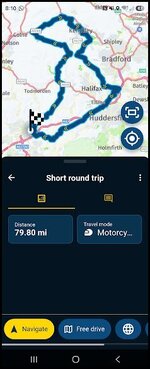
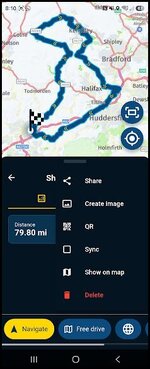
Just view the route on your phone and click the 3 dots and choose QR code.
It will be displayed on your phone and get everyone in your group to open their camera on their phone and scan you code, the route will open in their MRA.

Exmple
1784618255563.jpg

Click 3 dots

1784618278856.jpg

Click QR

You can also click share and send it over whatsApp with a link, ive tried this and it works great too
 
I'm using Android Auto which is pretty much the same.
My mate however uses Apple carplay and sharing a route between Apple/Android works fine which is another plus.

No need to share routes from account and all that faff.

Just view the route on your phone and click the 3 dots and choose QR code.
It will be displayed on your phone and get everyone in your group to open their camera on their phone and scan you code, the route will open in their MRA.

Exmple
View attachment 522690

Click 3 dots

View attachment 522691

Click QR

You can also click share and send it over whatsApp with a link, ive tried this and it works great too
Sorry should have realised obviously I use an iPhone so a little simpler, it seems you have sorted anyway good luck


Back
Top Bottom