Replacement for Zumo 390LMS

Tuckshop

Registered user
Joined
Aug 2, 2018
Messages
118
Reaction score
3
Location
STEVENAGE
OK, 5 questions regarding the Garmin XT range.


I need to replace my Zumo 390-LMS as it has started to muck me about so I want another SATNAV.

I want to stay with the Garmin range.

I know there are size differences.

I do not want one to go off road.

I do not listen to music or SATNAV instructions. I only look at the screen directions.

I do not link with other riders or worry where they are.


  • What other models are worth considering that use the same mount as the 390?
  • What are the differences between the XT, the XT2 and the XT3?
  • Are there any advantages in buying the XT2 over the XT and any advantage in buying the XT3 over the XT2?
  • Is there any advantage in getting the latest model?
  • Is there any advantage in buying new as opposed to second hand or refurbished?
 
I’m starting to look for a replacement for my Zumo 660 and use it the same way you do. No music, muted, and not linked to others. I don’t do apple CarPlay, don’t use google maps or any other third party mapping system just Basecamp. Any ideas will be helpful.
 
Personally for what you want, I would go for the XT.
Will update over WiFi (I do mine twice a year at home)
Less complicated routing algorithms
Probably cheaper

@Tuckshop I'm not far from you near Royston if you want to have a look at an XT
 
thanks for the offer of a look-see but not really needed.

Does the XT come with life time maps?
 
thanks for the offer of a look-see but not really needed.

Does the XT come with life time maps?
Good question. However I paid for lifetime maps for my old Zumo 660 and Garmin just stopped doing the map upgrades. The lifetime upgrades aren’t really lifetime, they’re just for a few years until Garmin decide to no longer do it. I wouldn’t fall for that again.
 
Good question. However I paid for lifetime maps for my old Zumo 660 and Garmin just stopped doing the map upgrades. The lifetime upgrades aren’t really lifetime, they’re just for a few years until Garmin decide to no longer do it. I wouldn’t fall for that again.
It the lifetime of the model production run plus a bit until its not supported anymore.

XT3 is out now.
 
It the lifetime of the model production run plus a bit until its not supported anymore.

XT3 is out now.
Strange how that isn’t mentioned in the sales blurb. Perhaps if it had been I wouldn’t have paid for it.
 
It also comes down to the operating system of the GPS unit.
The 660 series was the last of the old system, and Garmin crapped on all its users by no longer supporting the old O/S
You can upload newer maps by using Opensource maps.

The XT was the start of the new O/S and is still currently supported
 
XT is way more responsive than the old "LMXXX" series (I have 3 of them still) and the screen is way better.

One of the biggest benefits is the connectivity - but if you don't care it is a moot point, but the old LM models were herrendous with dropping connections etc.

For simple navigation I do not notice much difference, the live traffic can be good, but can send you on a detour that will take far longer than just sitting in the traffic if it's not a total road shut situation (it really is piss poor at times) and it can be bad at sending you on a long detout for non existent "road closures", a road near me was closed for a day for roadworks, it took Garmin almost 18 months to show it as open again! If I had believed it then when heading East from my home town the 2 mile drive to the main bypass would have been swapped for a ~10 mile detour that was not needed.

Most other things just work better, the lane assist is way better, screen bigger and much easier to see in bright light, it is a doddle to send routes from your phone - I always use My Route App and it is great to be able to just pick a route on the phone app and a few seconds later hae it importing onto the XT.....

....Talking of MRA, it works pretty well as a navigation aid if you don't need a big screen, it works pretty well, the spoken directions are good, only downside is the small phone screen, but I use it exclusively in the car....

....But the XT is way better for complex routes on the bike, espeically if you set the route to also diplay the track on the screen, so you can see if they nav is trying to take you off what you planned on the computer.

The XT3 is obviously the latest, but if you don't need a lean angle display you might find a good deal on them selling off the XT2 now the 3 is out, and that would be what I would go for as I dislike paying top dollar for the latest kit, got my XT(1) for a bargain price when the 2 was launched saving ~£150 IIRC, might treat the Mrs to my old XT1 if I see a good XT2 deal
:)
 
Had an XT, binned as in/after heavy rain, screen went haywire. I googled & its an issue experienced by a number of users. Sadly out of warranty. I got a new Zumo 396 which J&S were selling off. Disadvantage of a new (old) unit is battery life, so limited off bike time for programming. Don't want an XT2 as screen far too large. The XT3 with small screen would be an option if / when the 396 fails, although any new GPS will have some functionality I won't use. FTTB the 396 does me fine
 
If you like the Zumo 390 in what way is your current one mucking you about? Perhaps a cheap second hand Zumo 390 would suffice. I have a Zumo 340 and 390. They are good little units. I also have a Zumo XT and while the screen and functionality is great the routing logic is different and prefers major roads if using it as a point to point nav. As a nav for complex routes its great as long as you deploy more shaping points when route planning as unlike the Zumo 390 the altered routing logic means that routes planned on basecamp are not as "what you see is what you get" as the 390. I use MyRoute app for navigation now using Android Auto that is built into my Africa twin screen. I still have the XT mounted on that bike but use it for track creation track display and poximity alerted custom POI's. As an example of the odd point to pint routing of the XT I was leading a group of eight riders in the Borders earlier in the week and decided to cut the planned route short. I was in Rothbury in Northumberland and Google maps on Android Auto plotted a 92 Mile route back via various a and B roads. The XT plotted a route of 124 miles trying to aim for A roads and Motorway which would not have been faster.

https://zumouserforums.co.uk/viewforum.php?f=11

This site is best for the pros and cons of the various Garmin Zumo's
 
"If you like the Zumo 390 in what way is your current one mucking you about? Perhaps a cheap second hand Zumo 390 would suffice."...........


It has started to "freeze" when I input addresses directly into the unit, often tells me that a junction does not exist then uses that same junction description when I pick it up by browsing the map, and a few other things I cannot bring to mind ATM.
 
@Tuckshop , my pal uses an older Garmin and had similar problems. It also suffered the well known ‘poor battery’ problem but after using the standard cure for the battery it also sorted out the other things as well.
So it may be worth trying the ‘cure’ before spending money 👍
 
Rasher,how do you display the track as well as the route at the same time?
 
Rasher,how do you display the track as well as the route at the same time?
I’m more interested as to what a track is? If I plot a Basecamp and send it to my device. That’s it, there is no track just the route displayed. Is the track an alternative to the route?
 
A track is an unchanging breadcrumb trail. You can produce them in Basecamp or other routing software and run them in parallel with the route. It allows you to see if the unit deviates from your intended route if you use a contrasting colour for the track.
 
I’m more interested as to what a track is? If I plot a Basecamp and send it to my device. That’s it, there is no track just the route displayed. Is the track an alternative to the route?
I use mra,when exporting the route using gpx 1.1 I get a route and a track on my xt
 
I use mra,when exporting the route using gpx 1.1 I get a route and a track on my xt
That sounds very complicated. I plot a route on basecamp and send to device. Done. None of this 1.1 or whatever, just send.
 
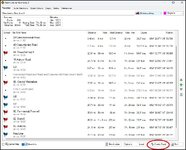
On your 660 you can send a route and a track to the unit. To create the track you hit the highlighted button after you have created the route.

1777719219179.jpg

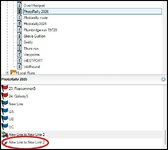
When you export the route to your 660 the track will go too.

1777719415997.jpg

In the 660 the track can be displayed along with the route in a similar manner to more recent units but its a bit more of a faff on the unit. To do this on a 660 you have to go to Tools > My Data > Import Data > Off-Road Tracks. (Garmin assumed you'd only use tracks offroad and not to check that your route was going via the roads you intended.)

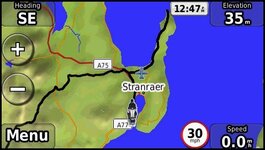
1777720074861.jpg

Then you can just run the route over the top of the track. On the 660 (I have a NAV IV which is largely the same) you can't adjust the width of the track as you can with later models so that you can see the edges of the track below the route but you can see (in this case if the black line diverge's from the magenta line of the route. To make the track visible Navigate to Tools > Off-Road Tracks, select your imported track, ensure "Show on Map" is checked, and select a contrasting colour. (The route is not shown above so that you can see the track)

In the Zumo 340, and 390 that I own the method to display the track is easier as its one step go to Apps > Tracks, select your track, tap the wrench icon, and check "Show on Map" The XT is similar.

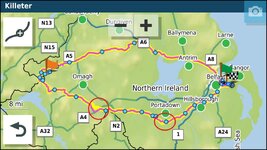
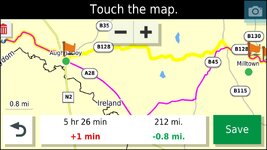
This is an example of a route and track displayed on a Zumo XT. You can see there is a problem at the two circled points between the intended route (the yellow track) and the route plotted by the unit.

1777720993233.jpg

This is a close up of the first problem area. It shows the problem with the Zumo XT routing logic. The intended route (the yellow track line) has been changed to "faster roads" instead of faster time by the XT's routing logic. To fix this you need an additional shaping point (waypoint) on the B128.

1777721246991.jpg

With regards to using MRA and GPX 1.1 for a route and track to the XT its slightly quicker than basecamp as you don't need to remember to create a track. I like basecamp and still use it for track management i.e. splitting and joining tracks and also for managing custom points of interest. For route planning I use MRA now as I can create routes on the fly with my phone if I'm on tour and can sync my complete route library with my phone. I now use MRA to navigate via Android Auto on my Honda's dash and only use the XT to run a track of the route and to indicate proximity alerted POI's loaded via Garmin POI loader.

Having run Garmins for over 20 Years if I was in the market for a new navigation device I'd use a offline rugged phone with a decent screen size and use MRA for routes and OSMand+ for tracks.

But as with all these things its horses for courses.


Back
Top Bottom