
Trying again

Using the mobile app as above you plonk your finger on point nine for a little moment it then becomes mobile and you can shift it about to your heart's content. To creat another waypoint between say 7 and eight. On the mobile app rest you finger on the line and a new waypoint with the correct number will appear. All subsequent numbers will advance by one. and you can put the waypoint where your finger is or move it about as described to put it on the road you want it to be on.
I’ve tried holding the waypoints I want to move for over five minutes now and it is not flashing. I’ve also tried just holding the place I want the route to go but nothing happens. The route is saved to “view your adventures”. Is it not possible to change it once saved?
 
You should watch some tutorials. Will be quicker than asking loads of Q's and awaiting responses.
 
Made a little video of prodding the screen in the app and editing. Hope it helps. Slightly more awkward to edit routes in the app on a phone compared to the browser app on a computer.

 
You should watch some tutorials. Will be quicker than asking loads of Q's and awaiting responses.
That’s the plan but I do seem to having problems that are not on tutorials. I was hoping it would be as user friendly as Basecamp but it’s nowhere near as easy to use. I’m going to have to get better with it though as my old Zumo 660 unit is on its last legs. So it’s either learn a new system or buy a new Sat nav that can use Basecamp.
 
That’s the plan but I do seem to having problems that are not on tutorials. I was hoping it would be as user friendly as Basecamp but it’s nowhere near as easy to use. I’m going to have to get better with it though as my old Zumo 660 unit is on its last legs. So it’s either learn a new system or buy a new Sat nav that can use Basecamp.
Ha ha, here we go again. Stick to basecamp :) The only way to learn it is to follow tutorials, there is also a good MRA forum where you can search and post questions. But it is different to Basecamp as discussed previously, personally I could never get on with Basecamp, so we are all different.

To move a waypoint, all you do is drag it to the new location.
 
Last edited:
Ha ha, here we go again. Stick to basecamp :)
I’ll stick with Basecamp for now but will need to learn a new system at some point. Unless of course Garmin start looking after it. In which case I’ll be ok.
 
That’s the plan but I do seem to having problems that are not on tutorials. I was hoping it would be as user friendly as Basecamp but it’s nowhere near as easy to use. I’m going to have to get better with it though as my old Zumo 660 unit is on its last legs. So it’s either learn a new system or buy a new Sat nav that can use Basecamp.
I found MRA easy and intuitive. I had no issues doing what you are asking about.
Basecamp was a load of nonsense for me and never routed me how I wanted.
Persevere as it really is good.
 
I found MRA easy and intuitive. I had no issues doing what you are asking about.
Basecamp was a load of nonsense for me and never routed me how I wanted.
Persevere as it really is good.
I’m trying but in Basecamp I just pick up the route and move it one cannot do this in MRA. It goes its own way. I’m trying on the laptop now and it is easier than the iPad. All my routes are black though and there doesnt seem be a way to make them different colours. Also I can’t send them to my sat nav which is sort of the point of it all.
 
Ha ha, here we go again. Stick to basecamp :) The only way to learn it is to follow tutorials, there is also a good MRA forum where you can search and post questions. But it is different to Basecamp as discussed previously, personally I could never get on with Basecamp, so we are all different.
To move a waypoint, all you do is drag it to the new location.
I don’t want to move the waypoints though, I just want to move the route.
 
I’m trying but in Basecamp I just pick up the route and move it one cannot do this in MRA. It goes its own way. I’m trying on the laptop now and it is easier than the iPad. All my routes are black though and there doesnt seem be a way to make them different colours. Also I can’t send them to my sat nav which is sort of the point of it all.
Pretty sure I've dragged routes about in MRA.
The problem is with you as you can make all those changes. Sending to Zumo XT is simple. Pretty sure I have a video on how to do it.
 
Pretty sure I've dragged routes about in MRA.
The problem is with you as you can make all those changes. Sending to Zumo XT is simple. Pretty sure I have a video on how to do it.
Just done it. I hovered over the route and a black plus appear then just dragged it to where I wanted it. So far so good. Still haven’t fathomed how to get it to the sat nav yet as there isn’t a send to device option. I’m pretty sure there will be a way.
 
Just done it. I hovered over the route and a black plus appear then just dragged it to where I wanted it. So far so good. Still haven’t fathomed how to get it to the sat nav yet as there isn’t a send to device option. I’m pretty sure there will be a way.

If you're using a tablet or phone you send it to the Garmin Drive App.

The app sends this to the XT (y)
 
If you're using a tablet or phone you sent it to the Garmin Drive App.

The app seed this and sends it to the XT (y)
I'm using the laptop now and the route drawing is easier. I'm wondering if i open MRA on the IPad after drawing the route on the laptop if the IPad will see the route. I can then maybe download the Garmin Drive App and send it to that? whether this can then send it to my old Zumo is a different matter. I don't have the Garmin Drive App at the moment. It does seem a lot of sending it here and sending it there instead of just send to device.
 
I'm using the laptop now and the route drawing is easier. I'm wondering if i open MRA on the IPad after drawing the route on the laptop if the IPad will see the route. I can then maybe download the Garmin Drive App and send it to that? whether this can then send it to my old Zumo is a different matter. I don't have the Garmin Drive App at the moment. It does seem a lot of sending it here and sending it there instead of just send to device.
Watch the video I posted.
 
I'm using the laptop now and the route drawing is easier. I'm wondering if i open MRA on the IPad after drawing the route on the laptop if the IPad will see the route. I can then maybe download the Garmin Drive App and send it to that? whether this can then send it to my old Zumo is a different matter. I don't have the Garmin Drive App at the moment. It does seem a lot of sending it here and sending it there instead of just send to device.

It's not as difficult as it sounds - once you've done it once successfully you won't forget.

Your iPad will see the route you've created on your laptop.

Install Garmin Drive on your iPAD and send the file as a gpx 1.1

Have your XT switched on and it will pair with Garmin Drive and import the route. (y)
 
Last edited:
It's not as difficult as it sounds - once you've done it once successfully you won't forget.

Your iPad will see the route you've created on your laptop.

Install Garmin Drive on your laptop and send the file as a gpx 1.1

Have your XT switched on and it will pair with Garmin Drive and import the route. (y)
My Garmin is an old Zumo 660. will it see this old device?
I'm slowly getting there. Basecamp took a bit of learning but i got there eventually.
Just looked at the price of BMW connectedride navigator!!!! jesus, over £500 for it. I can see the Garmin XT on the horizon its much cheaper.
 
I'm using the laptop now and the route drawing is easier. I'm wondering if i open MRA on the IPad after drawing the route on the laptop if the IPad will see the route. I can then maybe download the Garmin Drive App and send it to that? whether this can then send it to my old Zumo is a different matter. I don't have the Garmin Drive App at the moment. It does seem a lot of sending it here and sending it there instead of just send to device.
Once you have your route, you can export the route as a gpx file to your laptop, then you can load it into your 660. If you have an XT then as others have said, you can just get hold of garmin drive on your tablet or phone and then open MRA app on those devices and save the route to garmin drive, where it will automatically be uploaded to the XT, assuming your phone is linked to the XT
 
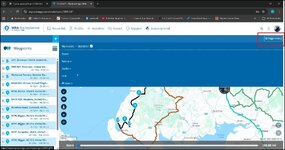
To export a route to your garmin 660. Go to the page menu
Go to export

1770059477414.jpg

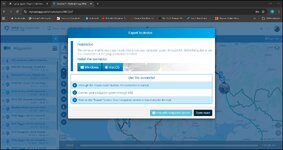
You get the option to load a connector so that when your 660 is connected to your computer the web app can "see" it

1770059642844.jpg

I don't use it myself. For my old Zumo 340 and 390 I just save as GPX 1.1 and transfer the downloaded file directly to the unit via file explorer when the 390 or 340 are connected to the computer. For my XT I use the drive app as others have suggested above.
 
To export a route to your garmin 660. Go to the page menu
Go to export

View attachment 477431

You get the option to load a connector so that when your 660 is connected to your computer the web app can "see" it

View attachment 477434

I don't use it myself. For my old Zumo 340 and 390 I just save as GPX 1.1 and transfer the downloaded file directly to the unit via file explorer when the 390 or 340 are connected to the computer. For my XT I use the drive app as others have suggested above.
Thanks very much. That’s great. Not much different to how I load my old Zumo from Basecamp.


Back
Top Bottom
