Why won't my PC boot up?

Andy B

Well-known member
UKGSer Subscriber
Joined
Apr 6, 2006
Messages
2,573
Reaction score
55
Location
Lea & Perrins country
Okay, before I have to throw any serious money at this could anyone offer me any useful advice to get this PC to boot up? I'm running Windows XP

This all started because I changed the fan and heatsink on the main processor. At the same time I decided to change the battery on the mortherboard as it is about 6 years old. The motherboard is an Asus A7V333 and has always been stable and reliable (which is why I'm prepared to stick with it).

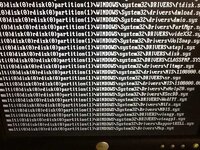
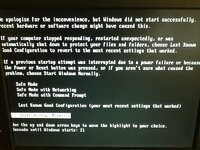
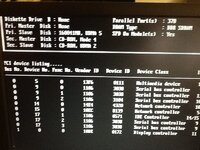
When booting up I get the last pic and it just hangs. Sometimes I can get to the screen that invites me to choose how I want windows to open (pic 2). If I choose Normal it just reboots. If I choose Safe option I get the first pic. I don't have a system recovery disc for this PC.

Any ideas?!:nenau
 

Attachments

  • photo.JPG
    photo.JPG
    119.7 KB · Views: 120
  • photo2.JPG
    photo2.JPG
    119.5 KB · Views: 121
  • photo3.JPG
    photo3.JPG
    118.6 KB · Views: 120
At a guess, you have either disturbed something e.g. memory module or cable, or removing the battery has reset/confused the CMOS and you may need to go into the bios and detect/set the hardware.
 
I see from the image that there is no Primary Master disk. Is this normal?
Do you only have one Hard disk?

I think you're on the right lines there...

Quite possible that the ribbon cable to the HD has been put on incorrectly.....it is showing one hard drive, but its not seeing it as the boot drive.

Go into bios and set the hard drive as the main, or change the ribbon cable (most have two plugs , one half way along...swap them around)
 
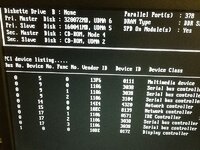
Okay - so I've identified the Primary HD in the BIOS and it seems to be recognising this now. Still no change in the boot-up though. I've checked all the cables to make sure they are properly seated and seem to be.

Any other ideas?:D
 

Attachments

  • photo4.JPG
    photo4.JPG
    116.8 KB · Views: 102
Make sure that it is booting from that drive first, assuming that's where your windows installation is.

It's too much of a coincidence that this has happened when hardware has been physically detached , so maybe try swapping the ribbon cable plugs around so that the two drives are physically linked in the opposite order than they are now.

Then try disconnecting power from mains and rebooting a few times.
My old Dell desktop does this occasionally, and it can take an hour to start up, getting apparently stuck on the loading screen like yours....look at the disk activity light, if it is flashing, even if intermittently, it means it's 'thinking about it' and it's worth leaving it to it for a bit.

Once mine has booted up once, I wait for it to have completely loaded all device drivers and so on, then I reboot and it comes up in 'normal' time again the next time around.


PS while you've got the ribbon cables disconnected, just check you didn't accidentally knock any microswitches over to tell that the HDs are master or salve....most IDE drives use jumpers, so you wouldn't have been able to change that accidentally, but I've had a few that were dip switch selected
 
Is the startup halting at mup.sys?

I can't tell I'm afraid. I can't see anything coming up to suggest it is.

I've just had another good play around with the main cable to the two drives with no success. In fact, both drives are now not being recognised on the boot-up! I'm wondering if it could be a dicky ribbon cable? I've got an old PC in the loft that I'm going to dig out and swap the cable to see what happens.

Watch this space!!
 
One way is to delve into the BIOS and set your boot disk as the first disk.

I would personally disconect the slave drive. Just remove the power lead or HDD cable then boot with just the main disk it will be much easier to sort it out that way.

You seem to be on the right track with the cables.


As an aside many years ago when building one of my first PCs I put it all together with two hard drives in then loaded windows. Somehow I managed to get the windows install across both disks, not sure how, but it meant I had to boot from the slave which then flipped over to the master. Remove the slave and it didn't want to know.


I think your problem will just be a test of your patience, nothing seems physically broken. Unlike my bikes always seem to be.


Back
Top Bottom