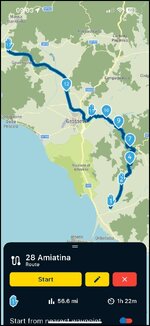
XT route and A/B direct route calculation issues

No avoidances. It’s a normal (very nice) thing road. Forgot to upload it yesterday as I fell asleep fairly quickly :)

I’m on the Le Shuttle (so chic) at the moment, I’ll upload the gpx when home (as the idea was to add it to the trip report as well).
 
You are not having much luck.

I have only once seen a screen like this on my XT:

img_2219-jpeg.439708


Which was when I was running a route (made by somebody else) which I think they’d crested in MyRoute or BaseCamp.

Maybe, when you are back, we should get together and try to work out where the problem lies?

:beerjug:
I had something similar when nicking routes for a trip. As soon as I converted track to route, it lost most shpaing / waypoints and then went all over the place like you show. I found the workaround to be setting your basecamp preference to direct routing. Then import the route/track. Then re apply your favourite profile in basecamp. That sorted my issue out. If that helps?
 
The files.

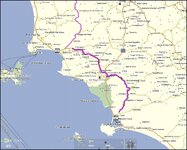
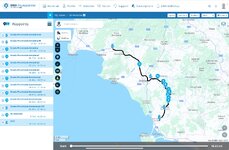
Short initial route - download here
Screenshot 2025-08-31 at 08.22.43.jpg

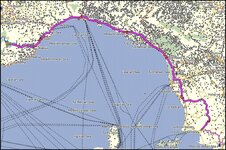
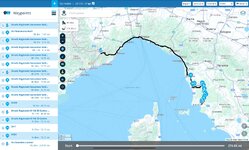
Longer remaining route - download here
Screenshot 2025-08-31 at 08.23.12.jpg

There are fairly straightforward routes north and were plotted the evening before leaving. I added enough shaping points to be sure it could route me through the initial part (SR439) before reaching Livorno and jumping on the motorway.

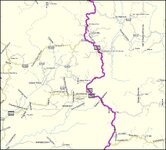
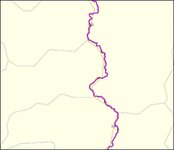
I just checked. The 439 is available (in lower detail) on Global map too:

Screenshot 2025-08-31 at 08.23.44.jpg

Screenshot 2025-08-31 at 08.23.52.jpg

So I don't understand the logic after which it routed via Aurelia (the road closer to the sea) with straight lines pointing back to this road, since it existed in Global Map if that was the issue.


I had this "straight lines" issue for years, if you remember. Forgot what was the fix.
Sometimes re-uploading the route fixes it. But I forgot to double check the actual route plotting before going to bed.
 
Thank you.

Other than a mid critisim that MyRoute recomdnds a shaping point every 5 km / 3 miles, the two sample routes seem to download and display properly.

IMG_1415.jpegIMG_1416.jpeg

That at least is encouraging.

From a Quick Look, the shaping points seem to be neatly placed, not scattered of in a field or worse.

Later on I’ll see what running them on:

A. My phone, using MyRoute’s Navigation app

B. My XT

Does to them.
 
that MyRoute recomdnds a shaping point every 5 km / 3 miles

I know - but I was lazy. :D

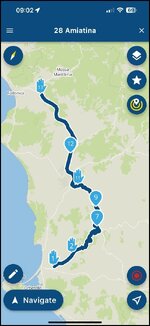
Interesting that the first route has 4 waypoints (hand). I didn't manually specify any, so they should all be shaping points bar the start/finish waypoints.
 
Good news.

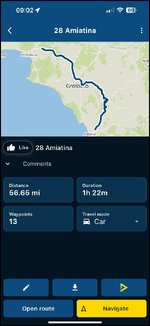
I have loaded the troublesome route into MyRoute’s Navigation app on my phone.

It displays properly.

I am pretty much sure that, if I stood at er-mini’s start point, the app woukd navigate me correctly to the end point. Similarly, I am sure that the app would direct me from London E1 to the start point and, from there, to the end.

IMG_5226.jpg

IMG_5227.jpg

IMG_5228.jpg

This reconfirms that there is nothing screamingly wrong with the route’s creation.

I’ll try it on my XT next.
 
Last edited:
More good news.

I have sent the route from my phone to my Garmin XT, via Garmin’s Connect app, using version 1.1

1. It transferred properly and quickly.

2. The shape (outline) of the route matches. The shaping and via point are all correct and the route’s length matches.

3. My XT will calculate me a route from my home to er-minio’s start point, right through to the end point.

I am convinced (or as convinced as I can be, without actually riding it) that everything should work exactly as it should. No fancy mucking about with my XT or strangeness at all.

Assuming I am correct, then the problem(s) would seem to lie in er-minio’s XT…..

:popcorn
:beerjug:
 
would seem to lie in er-minio’s XT…..

Now that I am home I'll (hard) reset and re-try.
But this has been happening forever (and in between resets).

This is also a replacement XT I got from Garmin years ago.

Thanks Richard.
 
looking at the above 2 routes i can confirm there is nothing wrong with them both upload and and show correct on all my software and devices. the route with the strange straight lines i have seen this on a few occasions and from memmory it has somthing to do with direct routing i believe.
 
From the screenshot:

img_2219-jpeg.439708


The XT seems to have done its best, routing er-minio along a parallel coast road, leading to the same end point.

It looks like the vivid green line * is the ‘route’ that er-minio created, with its blue shaping points. I suppose the magenta line is the XT device’s attempt to create a navigable route from it. The XT can plainly ‘see’ the blue shaping points (or most of them) as it has put magenta straight lines to them. I guess this was the device’s attempt to prove that the coastal route was as close as it could create, in order to get from A to B.

Besides possible concerns over the XT being faulty. I am wondering if perhaps there is something wrong with the maps?

er-minio, do you possibly have a third party map loaded and active on the device? I ask this as I once had Garmn’s own map AND an OpenStreetMap running in the background at the same time, with bizarre routing consequences.


* Why it’s bright green, I don’t know. Is it a track of the route, being displayed at the same time and coloured green so that it shows up? I don’t go in for all the “I want to show a track of the route, at the same time as running the route” malarkey.
 
Last edited:
I always have matching routes/tracks. Habit I developed over the years, when I realised routing never works. :D
It help(ed) me see if the routing from the Zumo veered off from what I originally planned in BC. As of this post, I am now riding following the track directly, skipping the route alltogether, as it is less faff.

The "green" is the track generated from that route. I didn't include it in the GPX files shared above.

So, essentially, in the screenshot above, purple should have been above green, matching it.

I also have no idea why some of the shaping point turned to waypoints. I didn't manually indicate any. I guess this might be a bug/issue with the old and unsupported BC. Fair.

When zooming in on the Zumo, the purple line wasn't even following existing roads to be honest.
I think I'll open a post on the Zumo forum.

XT is set to Faster Route.
Avoidances I think it's only U-Turn (I'll check).

Basecamp on Mac set the same.


Update, just checked and Zumo navigation settings are:
Calculation Mode: Faster Time
Off-Route Recalc: Automatic
Avoidances: Unpaved Roads Only (I go unpaved intentionally and have my own tracks and maps for that)
Custom Avoidances: None
Tolls and Fees: Allow (loadsamoney)
Environmental Zones: Allow


The only non-standard thing is that I have a custom, higher detail, topographic extra map file for the UK installed in the Zumo, that I use for greenlaning. But it is unchecked at the moment and weird behaviour, historically, has been with and without this extra map on file.
Map is non-routable and it enabled by error alongside the CN mapping I can spot it easily as the Zumo will stop indicating speed limits. That's the tell ;)
 
Last edited:
Off-Route Recalc: Automatic

Never a good setting; in my opinion. I have it turned off or at best set to prompted. In other words, I, not a dumb (but really very clever) machine decides what I want to do.

It’s only useful for bods who ask the device to take them from A to B. They can then be happy that, no matter far away they venture on their way to Tesco, they’ll always arrive.
 
The Zumo uses different profiles for different activities, such as "Motorcycle," "Automobile," or "Off Road". If you have an off-road or direct routing profile selected, it will calculate the shortest distance between waypoints, resulting in straight lines. or infact an older or incompatible map versions on your device can prevent it from correctly interpreting the route or one downloaded from a different piece of software
 
The Zumo uses different profiles for different activities, such as "Motorcycle," "Automobile," or "Off Road". If you have an off-road or direct routing profile selected, it will calculate the shortest distance between waypoints, resulting in straight lines.

True.
 
from memmory i think the same would apply to routes created in different profiles and then uploaded to the device.
 
from memmory i think the same would apply to routes created in different profiles and then uploaded to the device.

I think it does.

Not least I rember BaseCamp once refusing to route me down a sensible road. I could not work out why. I suddenly hit on the idea of changing my profile from motorcycle to RV / motorhome in BaseCamp. It then routed me ‘properly’.

MyRoute has a similar problem. They recommend always using the ‘Car’ profile when creating routes or using the Navigation app; so I do. The less fiddling around with settings and other ‘stuff’ the better, in my experience.
 
The Zumo uses different profiles for different activities, such as "Motorcycle," "Automobile," or "Off Road".

It's always on Motorcycle and always with the same exact navigation preferences.

When I use the Zumo for greenlaning (less often these days as I'd use a different bike and a 64s, when in the UK) all I do is to switch the maps manually. When offroad I just follow an uploaded track that is displayed on the screen. I don't even "navigate" it. I just look at the line. So, essentially, the Zumo is idling showing me the map.
I posted this video clip a few times before as you can see the Zumo screen:
As you can see it gives compass direction, there is no active ruote. You can see the (purple) track displayed on the topo map. But the sat nav is essentially just showing the map. No calculations, routing or other.

To be fair this is how I've been pretty much navigating this summer, with the only option of "navigating the track" in order to see distance to destination.

Rode like that from Chalons Sur Saone to home in London yesterday (and also for the rest of my trip to and from Italy). It's all good apart from having to go through a roundabout three times in Epernay as tracks don't give you lane/exist indications that are very handy in more complex built-up/city layouts. But can live with it.

You don't get traffic info, or anything else... that was one of the reasons I didn't shift to the Montana years ago. I should have done that, as it works closer to what/how I want it (and also can have other waypoints and proximity points around them).

Never a good setting; in my opinion. I have it turned off or at best set to prompted.

I'll try that.
I never did, because usually I always had carefully planned routes, but if I veered off (intentionally or getting off the wrong exit or for roadworks) I wanted it to re-send me on route automatically.
 
Last edited:
next time this happens try this, or if you still have the problem route, Go into your route settings on the device and change the "Route Preference" (e.g., from "Faster Time" to "Shorter Distance" and back) to force the device to recalculate the route using the roads.


Back
Top Bottom