MRA to Garmin Explore

V10SWC

Registered user
Joined
Jul 14, 2011
Messages
44
Reaction score
4
Location
North West
New to route planning and bought an XT,

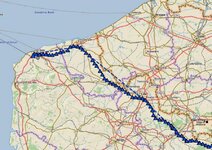
Using MRA to plan a route and then export to garmin explore, I end up with a map route full of little blue triangle.

Would somebody know what they are for ?
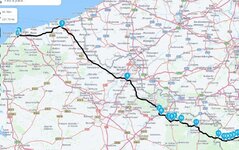
Untitled.jpgUntitled1.jpg

Thanks in advance
 
The blue triangles show active tracking, so when you go down a track (Garmin Explore) shows a track, not a route, if active tracking is enabled, it shows your location through location services as you move along the track.

Why it is showing if you haven't ridden the route I have no idea. Try asking or searching on the Garmin XT forum https://www.zumouserforums.co.uk/viewforum.php?f=48 plenty of advice on there.
 
Even better, ask on the excellent MyRoute app forum.

I have moved your question from the XT sub-section into the the MyRoute sub-section, as it all seems to revolve around the differences seen displaying routes (that have been created in MyRoute) in Garmin Explore. We do not have a Garmin Explore sub-section, or I would have moved it there. We rarely, if ever, see questions relating to Garmin Explore; I don’t know why.

I do not use Garmin Explore, but it apparently displays tracks as blue triangles. I suspect the reason might be that you have somehow exported both a route and a track (or quite possibly only a track) from MyRoute into Garmin Explore.


You appear to have also exported something else, too. The straight but broken blue line is evidence of something else being there.

c08e271648a544faf33ad1fb85cc957f.png


Judging by your second screenshot, the broken blue line joins up the shaping points you created in MyRoute, directly.

This can occur when the receiving software (in your case Garmin Explore) is unable to resolve all the data it receives. I see the same thing when I send a route I have created in MyRoute Google’s My Maps. It is easy to resolve in Google’s My Maps, as you simply delete the straight line.

I smell a misfit between Garmin Explore and whatever it is you have exported from MyRoute.


One question. Why are you sending the route you created in MyRoute to Garmin Explore, when you can send it directly to your XT?
 
As I said, I do not use Garmin Explore.

However, in an effort to help you, I have downloaded the Garmin Explore app onto my iPad, in the hope of replicating your problem. Just to be sure that we are talking about the same app, this is the app I downloaded:

9886b5af84d5f8700f37cc98027f883c.png


Using MyRoute and the Garmin Explore app on my iPad, I can’t replicate your problem exactly (in other words I can’t get it to show the little blue triangles) but I can get it to show the track (what you see as blue triangles) and umpteen straight lines.

b72de9ff822e3813e1af6d8edb90cb31.png


fd9dcba0a22e50886972b1f5262eedd9.png


To get this view, I saved (share as) the MyRoute route in the version ‘HD Boom Box 2019’ which, apparently, creates a track which can then be read by some Harley Davidson friendly software.

Whilst this does not replicate your problem exactly, it does seem to reconfirm my theory that you are seeing a software or replication misfit between the route you are creating in MyRoute and that displayed by Garmin’s Explore app.

Into what version of your MyRoute route are you saving the route as, before you send it to Garmin Explore?

If the misfit is indeed the cause of your problem, it still begs the question as to why you are sending the MyRoute route route into Garmin Explore in the first place?

Await your words.
 
I started using MRA, so please forgive if this is mad.
I have MRA and Garmin Drive on my phone, and my XT is linked to the Drive app.
I make a route on my PC. I then open this route on my phone and download as GPX 1.1
A window pops up asking if I want to share or open the file.
I select share and share to Drive.
Next think, the XT says it has received data and you are all set.
 
@wapping, if you log onto garmin explore via the web, any routes you have in your XT will show on the map. When you setup the XT I think there is an option to share your data from the XT with explore (you can disable this as explore keeps all routes as well as on the device). Anyway, explore if you are using location services, will plot your journey at certain intervals as you move down the track. So on a route I did from Dieppe to Belgium, if I look at it on explore, there are a lot of blue triangles at various time stamps, which was my location as I followed the track.

How there will be triangles on a route exported to the XT if it hasn't been ridden, I have no idea.
 
I started using MRA, so please forgive if this is mad.
I have MRA and Garmin Drive on my phone, and my XT is linked to the Drive app.
I make a route on my PC. I then open this route on my phone and download as GPX 1.1
A window pops up asking if I want to share or open the file.
I select share and share to Drive.
Next think, the XT says it has received data and you are all set.


Indeed, that is the standard way to send a route created in MyRoute into a Garmin XT device.

MyRoute > Garmin Drive > XT.

I really don’t know why the OP is sending the route into Garmin Explore, as it only seems to be adding a step and layer of confusion.

PS You can use version 1.2 quite safely when sending MyRoute’s routes into an XT, via Garmin Drive. How do I know? Because I do it all the time.
 
@wapping, if you log onto garmin explore via the web, any routes you have in your XT will show on the map. When you setup the XT I think there is an option to share your data from the XT with explore (you can disable this as explore keeps all routes as well as on the device). Anyway, explore if you are using location services, will plot your journey at certain intervals as you move down the track. So on a route I did from Dieppe to Belgium, if I look at it on explore, there are a lot of blue triangles at various time stamps, which was my location as I followed the track.

How there will be triangles on a route exported to the XT if it hasn't been ridden, I have no idea.

Thank you.

Yup, I probably now get that :beerjug:

My apologies, I was reading the OP’s post
…… Using MRA to plan a route and then export to garmin explore
as reading that he is creating the route in MyRoute and then exporting the same route to Garmin Explore, where the triangles are appearing. That, on my reading, woukd make the XT an irrelevance.

I may well have misunderstood it, with your explanation possibly being a much better one, being:

MyRoute route > Into XT > Out of XT > Into Garmin Garmin Explore. It is - if your explanation is correct - in stage four (into Garmin Explore) where the blue triangles are appearing. If so, then it seems that the OP is sending a track (not a route) from his XT into Garmin Explore. Garmin Explore is then, quite correctly, displaying the track as blue triangles.


I will ask the janitor to create a Garmin Explore sub-section, to assist answering questions on this or similar topics. It might though be really helpful if the OP can tell us exactly what he is doing, in ALL the stages leading to the appearance of the blue triangles in Garmin Explore.
 
Thank you.

Yup, I probably now get that :beerjug:

My apologies, I was reading the OP’s post as reading that he is creating the route in MyRoute and then exporting the same route to Garmin Explore, where the triangles are appearing. That, on my reading, woukd make the XT an irrelevance.

I may well have misunderstood it, with your explanation possibly being a much better one, being:

MyRoute route > Into XT > Out of XT > Into Garmin Garmin Explore. It is - if your explanation is correct - in stage four (into Garmin Explore) where the blue triangles are appearing. If so, then it seems that the OP is sending a track (not a route) from his XT into Garmin Explore. Garmin Explore is then, quite correctly, displaying the track as blue triangles.


I will ask the janitor to create a Garmin Explore sub-section, to assist answering questions on this or similar topics. It might though be really helpful if the OP can tell us exactly what he is doing, in ALL the stages leading to the appearance of the blue triangles in Garmin Explore.

To be fair, I read his post the same and I was going to ask "why are you exporting a route into explore rather than into the XT directly" But then I made an assumption that he was exporting into the XT and the XT was sharing with explore, he was then logging onto explore and seeing the track there. That is what I did when I first had my XT and then realised that when I setup the XT I shared the data with explore. I read a post not connected where people were deleting routes and tracks from the XT and then they were reappearing, and that was because explore was auto syncing with the XT. Therefore you had to delete on Explore and the XT or break the link. But that is unconnected :)
 
Indeed so.

Let’s wait to see what the OP tells us, when we’ll hopefully know how best to help him.
 
OP here,

I originally set my route on the MRA web site and exported with gpx 1.1 it to the garmin explore map so that it would sync to my XT.

Once in the explore map I see the blue triangles along with straight lines that are not on the the route but run to various points within the route as per the images.

If I have done it right I have only one route set at the moment and no other routes set and I don't understand where the straight lines appear from.
Once onto the XT the straight lines remain along with the intended route.
 
Don’t go via Garmin Explore, as that is what is causing you the problem.

Go straight to from MyRoute into your XT, via the Garmin Drive app.

Here is how:

https://www.ukgser.com/forums/showthread.php/571906-Getting-MyRoute-routes-into-the-Garmin-XT-easily

I use that simple method to transfer MyRoute routes into my XT. In a word, it works.

Try it. You can’t break anything, I promise.

Report back, please.


PS The straight lines are where an application (Garmin Explore, in your case) cannot reconcile data sufficiently to align it to a map. So it just draws straight lines between the known points. In your screen shot, the Garmin Explore app was apparently doing two things:

1. Correctly offering up a track version of the route, displaying it with the blue triangles.

2. Doing its best to, I guess, display the route itself, but it was unable to. So it did the next best thing, which was to display straight lines between the known points of route.

Here is an example of a misfit, using Google’s My Route app:

2635a586528dcdb7e34b1e1c4fc42aa9.png


As you can see, the track transferred from MyRoute into Google’s My Maps app perfectly, displaying it as the blue line. The route, for whatever reasons, lacked any data which My Maps could reconcile with the Google base map. My Maps therefore drew straight lines (drawn in black) to join up the only four points that it could reconcile, being: Start, End and two known intermediate points.

As you are learning, the transferring of GPX data is sometimes not quite the perfect science that it might be. Errors, such as you are seeing can be confusing, even if their cause is often quite simple. That being said, it is an awful lot better than it used to be.

Whichever method you use, ALWAYS check the route(s) you have installed in your XT BEFORE you leave home, by comparing them with the original route, sitting on MyRoute. Why? It is best practice. Not least, realising that there is an error, whilst you are sat at home, is a lot easier to mend (or get help with) now, than when you are sitting on the side of the road. Trust me; I have learned the hard way over the years….. and I am still learning now!

 
In general, avoid Explore. It’s shite, and can do some unhelpful things like removing routes from your device if you try to work your way around it’s crap interface.

I have to use it on my Montana 700 as that device doesn’t use the Drive app, if I need to get routes into it away from Basecamp but otherwise avoid it.

As others have mentioned it’s not needed for the XT so if I were you I would go through the phone pairing step again and skip the bit that connect la to Explore. Stick with Drive which works a treat.


Sent from my iPhone using Tapatalk
 
Berin, is spot on.

I avoid the Garmin applications, other than Drive, when it comes to getting routes or tracks into my XT. I also avoid any other other Garmin apps, which they pester you to add to your phone, home computer or iPad. In short, keep it very simple.

Drive though, is one of Garmin’s better applications, as it simply acts as a postman / letter box *, moving a GPX file from A to B. Assuming Garmin does not screw the Drive app up, most often by pandering to bikers’ requests for more and more crap functions to be added, it will stay OK for a while yet. Use it with confidence.


* That, along with ‘app’, has exhausted my IT speak knowledge.
 
Berin, is spot on.

I avoid the Garmin applications, other than Drive, when it comes to getting routes or tracks into my XT. I also avoid any other other Garmin apps, which they pester you to add to your phone, home computer or iPad. In short, keep it very simple.

Drive though, is one of Garmin’s better applications, as it simply acts as a postman / letter box *, moving a GPX file from A to B. Assuming Garmin does not screw the Drive app up, most often by pandering to bikers’ requests for more and more crap functions to be added, it will stay OK for a while yet. Use it with confidence.


* That, along with ‘app’, has exhausted my IT speak knowledge.

Worst is the Connect app which uploads everything to a data sharing site used by cyclers and runners and stuff, unless you figure out how to turn it all off.


Sent from my iPhone using Tapatalk
 
Thanks all,

Will remove explore from the system and try and do it through drive,

Here goes - and will report back if any more issues.
 
Splendid. Do let us know, please.

If the videos are correct, the Garmin Explore app does appear to work into an XT, via Garmin Connect. But, as it is so easy to use MyRoute (at least for on-road routes) then the use of Explore does seem limited, especially if it is clunky or unintuitive to manage.
 
All,

Many thanks saving to drive has worked and the route now shows up as planned on the XT.

One last question or is it two.

Whilst sat in the house playing around with the XT.

Does a track announce turn by turn or does it need converting on the XT to a route ?
 
Splendid. Do let us know, please.

If the videos are correct, the Garmin Explore app does appear to work into an XT, via Garmin Connect. But, as it is so easy to use MyRoute (at least for on-road routes) then the use of Explore does seem limited, especially if it is clunky or unintuitive to manage.

Yes, Garmin Explore does work taking routes into your XT, as this was the only way I thought you could do it! It’s a pain in the backside and clearly a step I no longer need to perform as I’ve just tested going directly into Garmin Drive and it works a treat. Thank you.
 
All,

Many thanks saving to drive has worked and the route now shows up as planned on the XT.

One last question or is it two.

Whilst sat in the house playing around with the XT.

Does a track announce turn by turn or does it need converting on the XT to a route ?

Tracks are like a line on a map, if you follow a track, then there is no announcements. You convert a track into a route. You can display a track with a route over the top if you use different themes ( you can load themes that show the track larger than the route). Generally the track sits under the route. Routes from MRA depending on which GPX you use, either passes just the start and finish waypoints or all waypoints or start and finish waypoints and the rest as shaping points. Shaping points do not show time to waypoints or distance. In the device you can change waypoints to shaping points, but it will recalculate the route as per the device settings. The XT can do a lot and there is a vast amount of learning, the websites earlier in the thread has some great guidance from some expert users.


Back
Top Bottom