Garmin have F**ked the Drive app.

Mzokk

Well-known member
UKGSer Subscriber
Joined
Jun 17, 2004
Messages
5,285
Reaction score
3,475
Location
Belfast NI
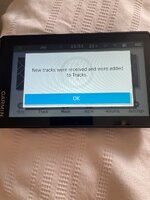
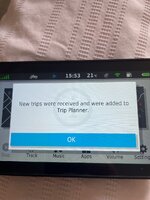
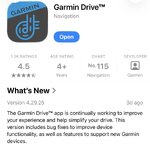
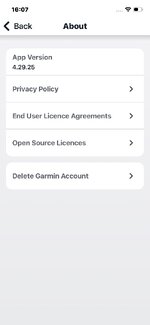
Using MRA with the Garmin Drive app and the XT was very handy, all you had to do was download the Route/Track to your phone and send the file via the drive app to your XT directly, without messing with the Explore app. Now you can can only send the MRA file to the drive app (which has been updated) but instead of directly transferring to the XT it puts the file in your "Explore" library which you then have to sync with your XT to get access to your GPX files. Explore is a shite piece of software. Please someone else check this? In case I'm missing something. To me it makes the XT much less useful. Oh and the version number is 4.29.25. If you use Drive and it hasn't updated I'd suggest you turn off the capability of it being updated.
 
Thanks for the tip off. I haven't connected mine since getting a new phone.
I'm off on tour for 3 weeks and hope there's no drama with it.
 
I’ve just downloaded a route from MRA to Garmin Drive and sent it to my XT - same as always. Am I missing something
 
Fuck, I never used Explore App, so now mine does fuck all, I used it fine a few days ago, so it has obviously auto-updated the app, so it now prompts me to "enable storage".

Basically trying to force you to share everywhere you go, everything you do, how fast you travel etc with Garmin, this will be the last Garmin device I ever buy, I found with the help of AI it can be fixed, but it is a PITA:

IMPORTANT: This uses 3rd party download site and requires a ton of safety features to be disabled to get the older version installed, and I got battered by adverts and it looks dodgy as fuck, as you keep getting adverts on the download site which then try and get you to setup and account, or buy a premium subscription, you need to close or scroll past these to get to the free download, if you get stuck, use the browser "back" button.

I used Google for the AI and it got me there, when I got stuck I just told it what was happening, for example as well as "Play Portect" my Samsung phone has its own protection built in which needed temporary diasbling.

This was my Journey using a Samsung A55 phone

Follow these steps to restore the working functionality: (At your own risk folks!!!!)

A recent update to the Garmin Drive app blocks direct .gpx file transfers from programs like MyRoute-app (MRA) and aggressively forces users into a "setup cloud storage" loop.

To fix this, you must completely uninstall the current app, download a working version from late 2025, and block Google from updating it. Here is exactly how to do it on an Android/Samsung device.

Step 1: Uninstall the Broken Garmin Drive App

Before you can downgrade, you must get rid of the current, broken version.
  • Long-press the Garmin Drive app icon on your phone.
  • Select Uninstall and confirm.
Piece of piss

Step 2: Temporarily Turn Off Phone Security Blocks


Android and Samsung phones feature strict security barriers that stop you from installing apps downloaded from the internet. You must turn these off for just two minutes to let the installation happen.
  • For Samsung Users (Auto Blocker): Go to your phone's main Settings > Security and privacy > Auto Blocker and turn it Off (verify with your PIN/Fingerprint).
  • For All Android Users (Play Protect): Open the Google Play Store, tap your profile picture at the top right, go to Play Protect > Settings Gear, and turn Off "Scan apps with Play Protect".

Step 3: Get the Extra Software Needed to Unpack the File

You may not need this step, but my phone would not open the APKM file natively

Trusted internet app archives often package large applications into a bundle file called an .apkm instead of a standard .apk. Android's built-in system cannot open an .apkm file on its own, so you need a free utility to unpack it.
  • Open the Google Play Store and search for APKMirror Installer.
  • Download and install this official, free tool (it has an orange/brown logo).

Step 4: Download the Working Older App Version
  • Open your mobile web browser and head to a trusted archive like APKMirror.com.
  • Search for Garmin Drive and scroll down to the "All Versions" list.
  • Locate and download a version from late 2025 (such as Version 4.27.65).
  • Note: Be careful to bypass deceptive, bright advertisement buttons asking for payment or account creation. The real download is completely free and will result in a file ending in .apkm in your Downloads folder.
I searched for that exact version, but ended up with 4.27.64 - close enough.

Step 5: Install the App Using the Unpacker Software
  • Open the APKMirror Installer app you downloaded in Step 3.
  • Tap Browse files, grant it permission, and go to your Downloads folder.
  • Tap on the Garmin Drive .apkm file and select Install package.
  • Tap "Watch ad and install" (this allows you to use the tool for free). Let the short 15–30 second video ad play to the end, then carefully tap the tiny "X" or "Close" icon in the corner.
  • When the official Android system window pops up asking "Do you want to install this app?", tap Install.
  • (You can now completely delete/uninstall the APKMirror Installer app from your phone; you no longer need it).
NOTE: The add I got left an "Install" button at the bottom after the ad finished, this was for the Add software (TEMU) and you have to close it with the "x" and then the real install option is underneath, beware of either installing extra shit, or thinking it is a con, once you close the add, the true "install" button is revealed.

Step 6: STOP the App From Updating Automatically (Crucial!)


If you skip this step, the Google Play Store will automatically overwrite your fix overnight.
  • Open the Google Play Store app.
  • Search for Garmin Drive and tap on its official store page listing.
  • Tap the three vertical dots in the very top-right corner of the screen.
  • Untick the checkbox that says "Enable auto-update".

Step 7: Turn Your Phone Security Back On
  • Go back into your phone's main Settings > Security and privacy > Auto Blocker and turn it back On.
  • Re-enable Play Protect settings inside the Google Play Store app if you turned it off earlier.

Step 8: Log In and Re-Pair
  • Open your newly restored Garmin Drive app.
  • Log into your existing Garmin account using your standard email and password (this is required to authenticate wireless Bluetooth transfers).
  • Turn on your Zumo XT, pair it via Bluetooth, and you are good to go!
Your standard MyRoute-app route transfers will now automatically bypass the cloud lock and beam directly to your Zumo XT exactly like they used to.

I avoided all the extra options and setting up "cloud storage" etc or else I might of ended up back at square one, I will probably stop updating the XT software now as well as they may notice people doing this and fuck up the functionality on the device.

I have now tested it and it works as it always did, I hated doing this, the app has limited pemissions and I have turned all my security back on, moving forward FUCK GARMIN! I was considering an XT2 down the line, but they can piss right off now, I will get one of those thingies where you get a big screen to run android on you can hook up to your bike and I will just use MRA or some other phone navigation app.



 
Last edited:
I’ve just downloaded a route from MRA to Garmin Drive and sent it to my XT - same as always. Am I missing something
Yup just did it as well, no change. I have quit the explore integration with my XT, so don't use it anymore
 
I’ve just downloaded a route from MRA to Garmin Drive and sent it to my XT - same as always. Am I missing something
You have either got auto-updates for the app turned off, or a nasty surprise to look forward to, I would have been fucked had this done this mid-tour, utter cnuts!
 
You have either got auto-updates for the app turned off, or a nasty surprise to look forward to, I would have been fucked had this done this mid-tour, utter cnuts!
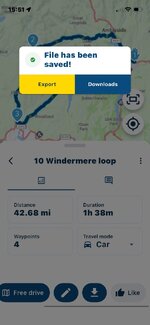
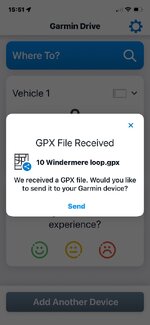
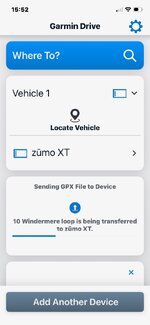
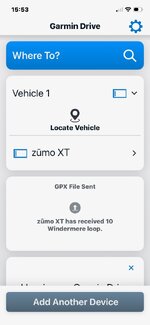
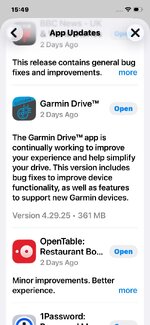
Nope, just checked my app updates, my drive app was updated 2 days ago. And it still works as it used too, some different screens/options, but I exported a MRA route to drive and it sent it to my XT and uploaded the route and the track.
 

Attachments

  • IMG_6800.jpeg
    IMG_6800.jpeg
    147.7 KB · Views: 6
  • IMG_6801.jpeg
    IMG_6801.jpeg
    98.1 KB · Views: 5
  • IMG_6802.jpeg
    IMG_6802.jpeg
    84.4 KB · Views: 4
  • IMG_6803.jpeg
    IMG_6803.jpeg
    82.1 KB · Views: 4
  • IMG_6804.jpeg
    IMG_6804.jpeg
    75.9 KB · Views: 4
  • IMG_6805.jpeg
    IMG_6805.jpeg
    268.1 KB · Views: 4
  • IMG_6806.jpeg
    IMG_6806.jpeg
    278.4 KB · Views: 5
I’ll have a go when I’m back home from my mother’s.

By its appearance, it looks like my main iPhone has updated the Garmin Drive automatically. I do though also have it on a sacrificial iPhone and on a sacrificial Samsung android phone, which might not have updated.
 
The update is dated 3/09/2026.
This one then! I'm using an iPhone. I seem to have the same update and it is still working for me. Perhaps its because I binned explore and the link to my xt
 

Attachments

  • IMG_6807.jpeg
    IMG_6807.jpeg
    49.6 KB · Views: 3
Nope, just checked my app updates, my drive app was updated 2 days ago. And it still works as it used too, some different screens/options, but I exported a MRA route to drive and it sent it to my XT and uploaded the route and the track.
Good to see that the new version appears to work as always with IOS. In Android it asks you to enable storage (explore) on the device and if you say maybe later which is the other option.......nothing happens.
 
Good to see that the new version appears to work as always with IOS. In Android it asks you to enable storage (explore) on the device and if you say maybe later which is the other option.......nothing happens.
Makes a change for IOS to work :)
 
Good to see that the new version appears to work as always with IOS. In Android it asks you to enable storage (explore) on the device and if you say maybe later which is the other option.......nothing happens.
Did you have Explore installed and/or enabled on the Android?
 
Makes the XT pretty useless. It can’t be enabled as a mass storage device like a Montana, so Drive was the only way to get routes in, except via Basecamp or the useless Explore app.
 
Did you have Explore installed and/or enabled on the Android?
No Berin. Thankfully not. But it appears that for android at least we are being forced that way. I was in contact with Garmin support and sent them a requested video of it not working. I'm not holding my breath!! When it asks to enable storage and you click maybe later nothing further happens at least on my phone.
 
What a pain.
We’re away at the moment and transferred the routes to Mrs Berin’s XT before we went, but we did send one over yesterday after I’d fixed it - the XT had recalculated it. It worked fine but it’s iOS.

I’m using the Montana, but as per the other thread I think I’ll switch to DMD after this trip, just for convenience
 
I’ll test later. My XT is “disconnected” from the Explore ecosystem.

Let’s see what happens
 
…. the XT had recalculated it.

It shouldn’t. Not dramatically at least.

Assuming the route was created and sent from MyRoute’s Routeplanner:

How many shaping points did the route have? MyRoute recommended one every 5km / 3 miles, for transfer to a Garmin device.

Which GPX version did you save and transfer the route in? I find 1.1 very reliable for transfer into my XT, as it transfers with it the blue shaping points and the orange flag way points, which are then displayed on the route on the XT.

Which map was it created in? Here? TomTom? OSM? Something else?

What preference settings are there on the XT which might have forced a recalculation?
 
Last edited:
It shouldn’t. Not dramatically at least.

Assuming the route was created and sent from MyRoute’s Routeplanner:

How many shaping points did the route have? MyRoute recommended one every 5km / 3 miles, for transfer to a Garmin device.

Which GPX version did you save and transfer the route in? I find 1.1 very reliable for transfer into my XT, as it transfers with it the blue shaping points and the orange flag way points, which are then displayed on the route on the XT.

Which map was it created in? Here? TomTom? OSM? Something else?

What preference settings are there on the XT which might have forced a recalculation?
If you use gpx 1.1, the XT will recalculate the route between shaping points as per your device setup, if you use loads of shaping points it should be ok.

I have been trying gpx 1.2 and although it doesn't show the shaping points, it does show the waypoints and it follows the track without any recalculation as long as you have auto recalculation switched off.

Now I will admit I am not as "expert" as some on here, so take the above with a pinch of salt, that is what I have found researching the differences and this is only true with the XT apparently


Back
Top Bottom