MyRoute waypoints - What happens if I miss one?

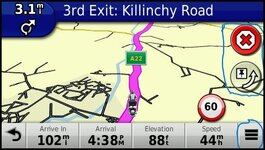
1757334125073.jpg

I ran phone and Nav 5 together today and intentionally missed out a waypoint. On the phone I cancelled the waypoint and it re routed to the next one but on the Nav 5 I couldnt as I can’t see a cancel button….
On the Nav5 you can set up the screen to have a number of "custom" buttons on it. This is a Zumo 390 but I run it with the skip button and stop route while navigating. On the BMW with a whizzy wheel you can operate these buttons without poking the screen. If you don't customise the screen you can access the buttons via the hamburger menu circled.

This is a link to the Nav5 manual which explains setting up the Nav and Screen.


The MyRoute app support page is great for learning the app and includes video resources. The best thing is with the NAV5 and the app you can test loads of stuff from your sofa:D But there is a learning curve and the more you put in the more you get out.

 
Ok. When I click on export a drop down box comes up and I clicked on Garmin(GPX1.1).
Where is Choose download format?
If you click on that it downloads the route/track into your downloads folder on your computer.
 
I've a bit of trouble transferring routes as the Zumo, of course, recalculates them using its navigation settings.

I've had the most success with all avoidances off and Shorter distance selected.

If all else fails, and it's just being difficult, you can use the option in the Zumo of Route from Track; the Track always seems to transfer over faithfully.

Waypoints and Shaping points are lost with this method.
If you use this method. Turn off auto recalculation, or if you go off route the nav will calculate you directly to the last waypoint which can result in a very short trip if its a circular route :D
 
If you use this method. Turn off auto recalculation, or if you go off route the nav will calculate you directly to the last waypoint which can result in a very short trip if its a circular route :D

Thank you - you're a treasure chest of information. (y)
 
If you leave the app running in the background, when you restart you get a "resume navigation" option on the screen and off you go.

If you close the app, when you restart, you can also:

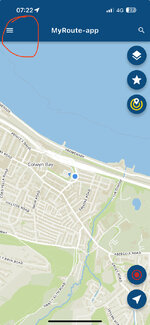
1. Tap the hamburger, top left:

IMG_5288.jpeg

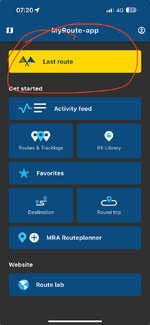
2. Tap ‘Last route’

IMG_5286.jpeg
 
When skipping points, it’s a good idea to create routes by following MyRoute’s ‘Best practice’ of having a shaping point every 5 km / 3 miles.

Why?

A. It gives the app somewhere, other than the end, to aim for next.

B. If, when riding the route, you (for example) want to cut out a section, you can tap the point you want to go to. The app will then take you to that point, based on your routing preferences. Your route will then run normally thereafter.


Back
Top Bottom